You apply to a job. Your resume vanishes into a black hole. Two weeks later, an auto-rejection email. You probably never reached a human. The reason: an Applicant Tracking System (ATS) filtered you out first.
ATS software now handles over 75% of resumes submitted to mid- and large-size employers in 2026 — Workday, Greenhouse, Lever, Taleo, iCIMS and dozens of others. This guide explains in plain English what an ATS actually does, why most resumes fail it, and the exact format that gets you past the bots and into a recruiter's queue.
What is an ATS?
An Applicant Tracking System is software that companies use to collect, parse, score, and rank job applications. Every time you click "Apply" on a corporate career site (or submit through LinkedIn Easy Apply that routes to a company's system), your resume lands in an ATS — not directly in a recruiter's inbox.
The largest ATS platforms in 2026 are:
- Workday — used by ~40% of Fortune 500 (Bank of America, Target, Salesforce)
- Greenhouse — popular with tech companies (Airbnb, Slack, Stripe)
- Lever — used by mid-size tech and startups
- Taleo (Oracle) — heavy enterprise, government, retail
- iCIMS — large enterprise (UPS, Capital One)
- Greenhouse, SmartRecruiters, Jobvite, BambooHR — smaller orgs
All of them do essentially the same thing: convert your uploaded resume into structured data (name, email, work history, skills), then let recruiters filter the resulting database by keyword, years of experience, location, education, etc.
How an ATS parses your resume
When you upload a PDF or .docx, the ATS runs an OCR + parsing pipeline:
- Extract raw text from the file (PDFs need clean, selectable text — scanned images and designer-tool exports often fail here).
- Detect section headings ("Experience", "Education", "Skills", "Summary") and route the text below each into the right database field.
- Identify dates, job titles, company names, and degrees using pattern matching.
- Build a keyword index of every skill and acronym in the document.
- Score the resulting profile against the job description's required keywords.
Things that break parsing in 2026:
- Resume built in Canva, Figma, or InDesign with text inside images or text boxes
- Two-column layouts where the parser reads across columns and merges unrelated text
- Header sections inside images (logos, photos of yourself)
- Non-standard section headings ("What I Bring" instead of "Experience")
- Tables for layout (not data) — many ATS systems mangle them
- Fancy fonts that don't embed properly in the PDF
Running several interview processes at once? Log each stage in the free job application tracker so no follow-up slips through.
ATS screening explained: what happens after you click Apply
"ATS screening" is not one filter. It is a sequence of steps, some automatic and some done by a recruiter inside the software. Knowing which step you fail at tells you what to fix. Here is the path a typical application follows at a mid-size or large employer in the US or Canada.
- The application form and knockout questions. Before your resume is read, the form asks screening questions: are you legally authorized to work in this country, will you need visa sponsorship, do you have the required license or degree, are you willing to work on site, what are your salary expectations. Employers can mark some of these as "knockout" (or "disqualifying") questions. An answer that does not meet the requirement can move the application straight to a rejected or "not qualified" status, often without anyone reading the resume. Answer them truthfully and carefully — a mis-click here is the most common automatic rejection.
- Parsing. The ATS extracts the text of your resume and fills a candidate record: contact details, job titles, employers, dates, education, skills. Anything it cannot read — text inside images, headers, unusual layouts — is missing from the record, even if it is visible on the PDF.
- Matching and ranking. Depending on the system and how the employer configured it, the ATS may compare your record with the job description and show the recruiter a match score, a ranking or "recommended" candidates. Many recruiters also run their own keyword searches across the applicant pool ("Python AND AWS", "RN AND ICU").
- Recruiter review. A recruiter opens the shortlisted profiles, reads the parsed record or the original file, and moves candidates to a stage: phone screen, hiring-manager review or rejected. This is where formatting and clear bullets matter again, because a human is now reading.
- Assessments and interviews. Some roles add a skills test, a one-way video interview or a questionnaire, all tracked in the same system. Each stage change can trigger the automatic emails you receive.
- Disposition. When a candidate is rejected, the recruiter selects a reason (not qualified, position filled, withdrew…). This is why you sometimes get a rejection email minutes after applying (a knockout answer) and sometimes weeks later (the role was filled).
The practical lesson: an instant rejection usually points to a knockout question; silence for weeks usually points to ranking and search, where your keywords and titles did not match what the recruiter searched for. Our article on the four ATS filters that reject resumes goes deeper on each one, and the screening question templates show how to answer the most common form questions.
Knockout questions you will see most often
- "Are you legally authorized to work in the United States / Canada?"
- "Will you now or in the future require sponsorship for employment visa status?"
- "Do you have a [bachelor's degree / active RN license / CPA / security clearance]?"
- "How many years of experience do you have with [skill]?" (a number below the minimum can be disqualifying)
- "Are you able to commute to [city] / work on site [number] days a week?"
- "Are you at least 18 years of age?"
Never exaggerate an answer to pass a knockout question: the same facts are checked in interviews, references and background checks.
Why 75% of resumes get rejected
Most rejections aren't because the candidate was unqualified — they're because the ATS couldn't parse the resume, or because the recruiter filtered by keywords the candidate forgot to include.
A typical filter looks like: "Show me candidates with 5+ years + Python + AWS + San Francisco or Remote." If your resume says "Python programming" but not the literal word "Python" in a parseable position, you might be excluded. If your bullet says "~6 years of engineering work" but the parser couldn't pull out a number, you fail the 5+ years filter too.
Two simple fixes solve this for most candidates:
- Mirror the job description's exact wording. If the posting says "project management," don't write "managing projects" — write "project management."
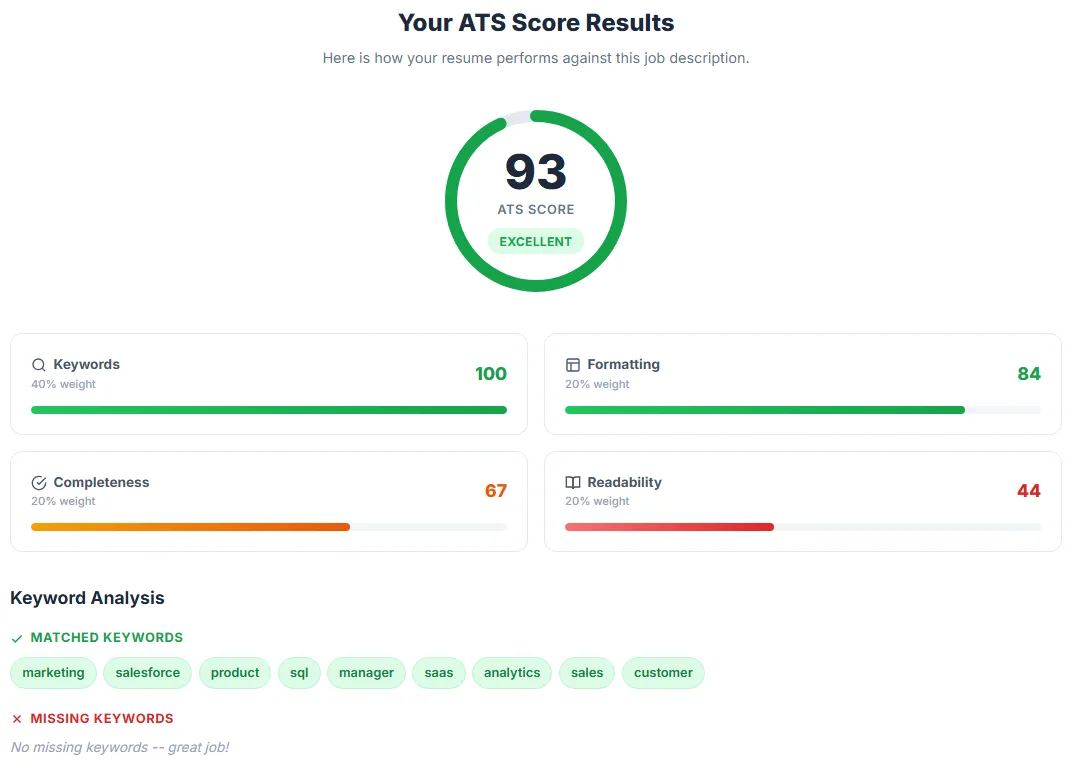
- Test your resume against the job description before applying. The AutoApplyMax free ATS Score Checker does this in 10 seconds: paste your CV + the job description, get a 0–100 match score plus the exact missing keywords.
What ATS-friendly actually looks like
Forget every "creative resume template" you've seen on Pinterest. For an ATS in 2026, the optimal resume is:
- Single column, top-to-bottom reading order
- Standard fonts (Calibri, Arial, Helvetica, Inter, Georgia)
- Black text on white background, no colored sections that hide content
- Section headings with these exact labels: Professional Summary, Experience, Education, Skills, Certifications
- Dates in MM/YYYY or Month YYYY format — never just years, never "Present" alone
- One quantified metric per bullet where possible ("Increased revenue 32%")
- Exported as a text-based PDF (Save As → PDF from Word or Google Docs, not Print to PDF)
- One page if you have under 10 years of experience, two pages max otherwise
Keyword matching: how to actually rank well
Recruiters search the ATS database by typing keywords from the job description into the filter. Your job is to make sure every important word from the posting appears in your resume, in context.
Workflow that takes 90 seconds per application:
- Copy the full job description.
- Paste it into the ATS Score Checker alongside your resume.
- Look at the "Missing Keywords" section — usually 3–8 terms.
- For each missing keyword, ask: do I actually have this skill? If yes, add a bullet or a Skills line that uses the exact term. If no, skip it (don't lie).
- Re-run the check until you're at 80%+ match.
Most candidates skip this step because doing it manually for every application takes ~10 minutes. AutoApplyMax's AI Resume generator does it in 30 seconds — paste the job description, get a tailored version with all the matching keywords already woven in.
Going further: the four ATS filters that reject resumes (with sourced data), and why a tailored resume beats a generic one.
Common ATS myths debunked
- Myth: PDFs don't work in ATS. False since ~2022. Modern ATS handles text-based PDFs as well as .docx. Only scanned-image PDFs and Canva exports cause problems.
- Myth: Use white text to hide keywords. Don't. Every major ATS detects this and either flags or auto-rejects the application. Same for repeating keywords in the footer.
- Myth: You need an ATS-specific resume template. No — a clean, single-column resume in Word or Google Docs works fine. "ATS templates" sold for $30 are mostly just clean Word documents.
- Myth: The ATS makes the hiring decision. False — recruiters do. The ATS just filters the database for them to review.
How to check if your resume is ATS-friendly (a 5-minute test)
You do not need special software to find the most common parsing problems. Run these five checks on the exact file you plan to upload:
- The copy-paste test. Open your PDF, select all the text and paste it into a plain-text editor (Notepad, TextEdit in plain-text mode). If text is missing, scrambled, merged across columns or comes out as odd symbols, an ATS will likely see the same thing.
- The headings test. Check that your sections use standard names: Summary, Experience (or Work Experience), Education, Skills, Certifications. Creative headings such as "My Journey" or "What I Bring" may not be mapped to the right fields.
- The contact test. Make sure your name, email and phone are in the body of the page, not only in the document header or footer, and not inside an image or icon.
- The dates test. Every job should have a start and end date in a consistent format (for example "Mar 2023 – Present" or "03/2023 – 06/2025"), on the same line as the title or employer.
- The match test. Paste the job description and your resume into the free ATS score checker. It returns a score out of 100, the keywords it found and the ones that are missing. For a general review without a job description, use the resume checker, and check page count with the resume length checker.
If the copy-paste test fails, the quickest fix is usually to rebuild the resume in a single-column layout. Our ATS-friendly resume templates page explains which layouts are single-column and which are two-column.
ATS-by-ATS notes: Workday, Greenhouse, Lever, iCIMS and Taleo
All applicant tracking systems parse and store resumes, but the candidate experience differs. These are the differences that matter when you apply:
| ATS | What you see as a candidate | What to watch for |
|---|---|---|
| Workday | An account per employer, a resume upload that pre-fills "My Experience", then several pages of questions and voluntary disclosures. | Review every pre-filled job and date: parsing errors here become your record. Keep the same email for every Workday employer you apply to. See our Workday application playbook. |
| Greenhouse | Usually a single page: contact details, resume and cover letter upload (or paste), LinkedIn URL and custom questions. | Custom questions can be required and are read by the hiring team. A pasted cover letter loses formatting, so keep paragraphs short. See the Greenhouse application guide. |
| Lever | A short single-page form that can pre-fill fields from your resume, plus an "Additional information" box. | Check the pre-filled current company and title. Use the additional information box for one or two sentences tied to the role, not a full letter. |
| iCIMS | Account creation, resume upload with parsing, then profile pages and screening questionnaires; common at large employers. | Questionnaires often contain knockout questions. Save your answers somewhere — the same questions repeat across employers. |
| Taleo (Oracle) | A multi-step flow with an account, resume upload, long profile forms and prescreening questions; frequent at large enterprises and public bodies. | Parsing of older layouts can be imperfect: re-type fields that come out wrong, and keep a plain, single-column resume for these portals. |
Whatever the system, the resume that works best is the same: text-based, single column, standard headings and the posting's own wording for skills and job titles.
ATS screening checklist: 12 checks before you apply
- File is a text-based PDF or .docx (no scanned image), named Firstname-Lastname-Resume.
- Single-column layout, no text boxes, no tables used for layout, no skill bars or icons.
- Contact details in the body of the page, with city and state or province.
- Standard section headings: Summary, Experience, Education, Skills, Certifications.
- Job titles written the way the industry writes them (add the posting's wording in the summary if your official title was unusual).
- Start and end dates for every role, in one consistent format.
- The must-have skills from the posting appear in your bullets and in the Skills section, spelled exactly as in the posting — see resume keywords by job, for example software engineer, registered nurse or project manager keywords.
- Acronyms written both ways once, for example "Search Engine Optimization (SEO)".
- Certifications and licenses listed with issuer and, where relevant, number or expiry date.
- Length checked: one page for early-career, two pages at most for most experienced roles.
- Knockout answers (work authorization, sponsorship, licenses, location) checked against the posting before you start the form.
- Match tested against the job description, then the resume tailored to the gaps you can honestly fill — the resume tailoring tool shows the missing keywords and rewrites a few bullets for free.
Want to see what a resume that passes these checks looks like? Browse resume examples by job title, such as the data analyst resume examples or customer service representative examples, each shown at entry, mid and senior level.
Tools that test ATS compatibility
Free in 2026 (no signup required):
- AutoApplyMax ATS Score Checker — instant 0–100 score, missing keywords highlighted, recommendations. No login. Try it →
- Jobscan — similar free tier (5 scans/month), paid above that
- Resume Worded — broader resume feedback, ATS check is one component
What to look for in any tool:
- Does it accept both your resume AND a job description? (Just scoring the resume alone is meaningless without the JD context.)
- Does it show missing keywords, not just present ones?
- Does it give specific formatting issues (e.g., "2-column layout detected")?
What to do once you've passed the ATS
Passing the ATS gets you into the queue. The next step is recruiter review (typically 6 seconds per resume), then a screening call, then interviews. To maximise your odds at scale:
- Apply to 30–50 jobs per week, not 5. The ATS-keyword game is largely a numbers game.
- Tailor your resume to each job. Generic resumes match maybe 50% of keywords; tailored ones match 80–90%.
- Track which applications get callbacks. The pattern reveals what's working.
This is exhausting to do manually. AutoApplyMax automates the entire loop: it auto-applies on LinkedIn Easy Apply and universally autofills forms on Indeed / Glassdoor / WTTJ / Monster, generates a tailored CV per job description, and tracks every application in one dashboard. Free Chrome extension, 1 free AI tailoring per month.
If you want to go deeper on resume-side tactics, read ATS Resume Tips: Beat Applicant Tracking Systems and What Recruiters Actually Look For in a Resume.
Test your resume against any ATS in 10 seconds
Free ATS Score Checker — paste your resume and a job description, get an instant 0-100 match score plus the exact missing keywords. No login, no email required.
Check My Resume FreeWant a template that passes ATS? Compare our free ATS-friendly resume templates — which are single-column, which are two-column, and how to fill them from your CV.
FAQ: ATS screening
What is ATS screening?
ATS screening is the process an applicant tracking system uses to sort job applications: it records your answers to the application questions (some of which can be knockout questions), parses your resume into a candidate record, and lets recruiters rank and search applicants against the job requirements before a person reviews them.
What are knockout questions in a job application?
Knockout questions are application-form questions that an employer marks as requirements, such as work authorization, visa sponsorship, a required license or a minimum number of years of experience. An answer that does not meet the requirement can automatically move the application to a rejected status.
How can I tell if my resume is ATS-friendly?
Copy all the text from your PDF into a plain-text editor and check that nothing is missing or scrambled, use standard section headings, keep contact details out of the header and footer, and run the file against a real job description in a free ATS checker to see the score and missing keywords.
Does every company use an ATS?
No. Most mid-size and large employers do, as well as many staffing agencies, but small businesses often receive applications by email or through a job board. Formatting your resume for an ATS costs nothing with a human reader, so the same simple, single-column resume works in both cases.
Can an ATS read a two-column resume?
Some modern parsers handle two columns correctly, others read straight across the page and mix the columns together. Because you cannot know which parser an employer uses, a single-column layout is the safer choice for online applications.
Do LinkedIn Easy Apply applications go through an ATS?
Easy Apply applications are received in LinkedIn's own applicant management, and many employers connect it to their ATS so your profile and resume end up in the same system as other applicants. Either way, the resume you upload is read by recruiters, so it should be as clear and keyword-matched as for any other application.