10,000+ users · 100,000+ applications · 50x faster

AutoApplyMax: your AI job application assistant, from resume to auto-apply, in one Chrome extension.

AutoApplyMax is a Chrome extension and web app that auto-applies to LinkedIn Easy Apply jobs, autofills applications on other job sites, writes a tailored resume and cover letter for each offer, checks your ATS score and tracks every application in one dashboard.

  • Auto-apply on LinkedIn, autofill and track every application: apply to far more jobs in the same time
  • Tailor your resume to each job with AI: pick a template, boost your keywords and your ATS score
  • Check your ATS score and job match: the extension shows your % match on LinkedIn, Indeed and Glassdoor jobs before you apply

Free plan & tools · Web dashboard + Chrome extension

Used by candidates who landed jobs at

How It Works

How your AI job application assistant works

Set it up once. Every application after that starts from your profile.

  1. 1

    Upload your resume

    Drop in your PDF or Word file once. It becomes the profile behind every tailored resume and every application.

  2. 2

    Get a resume tailored to each job

    Paste a job description and AI rewrites your resume around it. Your ATS score shows which keywords are still missing.

  3. 3

    Auto-apply on LinkedIn, autofill everywhere else

    The Chrome extension auto-applies to LinkedIn Easy Apply jobs. On other job sites, it fills in the form for you — you review it and click Submit.

Demo

See AutoApplyMax in action

Everything AutoApplyMax does, in under 40 seconds

Auto-apply on LinkedIn Easy Apply, autofill everywhere else, an AI resume and cover letter for each job, your ATS score and every application tracked.
One-click install from the Chrome Web Store
Set up once from your resume
Every application logged in your tracker
6 tools, 1 workflow

Everything you need to auto apply to jobs, from ATS check to tracker

Real screens from the AutoApplyMax dashboard and Chrome extension, shown with a demo profile.

01 · ATS resume checker

Know your ATS score before you apply

Upload your resume, paste the job. In seconds you see what an applicant tracking system will miss.

  • Keyword match against the job description
  • Missing keywords, formatting and readability, explained
  • Free, no signup needed
Check my resume's ATS score
02 · AI resume builder

A tailored resume for every job, with its match score

Paste a job description. AI rewrites your real experience around it and shows the keywords still missing.

  • Match score and missing keywords for each job description
  • 6 templates, PDF and Word download
  • Unlimited AI rewrites in the editor, free on every plan
  • Never invents jobs, degrees or numbers
03 · AI cover letter

A cover letter that matches the job, not a template

Written from your resume and the job description, ready to edit in the same editor.

  • Choose the tone and the length
  • 6 layouts, PDF and Word export
  • Rewrite any paragraph with AI, free on every plan
04 · LinkedIn auto-apply

Auto-apply to LinkedIn Easy Apply jobs while you do something else

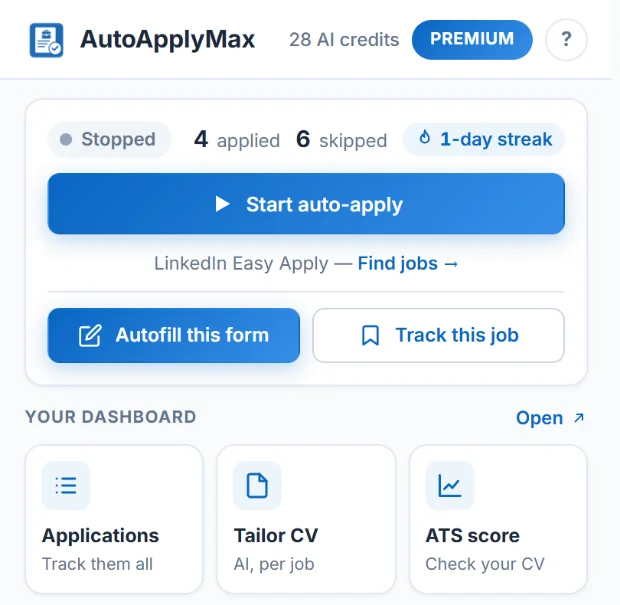
Run your LinkedIn search, click Start auto-apply. The extension fills each Easy Apply form from your profile and submits it.

  • Auto-apply to LinkedIn Easy Apply jobs, unlimited on every plan
  • Human-like pauses; it waits out LinkedIn rate limits, then resumes
  • Premium: AI answers the screening questions
AutoApplyMax Chrome extension popup: auto-apply status, Start auto-apply, Autofill this form and Track this job
05 · Universal + AI autofill

Autofill job applications on every other site

Indeed, Glassdoor, Workday, Greenhouse, Lever, company career sites: the extension fills the form, you review it and click Submit.

  • Free: name, contact, links and experience from your profile
  • Premium: AI writes answers to open questions on 100+ ATS portals
  • Nothing is sent until you click Submit
06 · Job application tracker

Every application in one place

Stop losing track of where you applied.

  • LinkedIn auto-applies are logged automatically; save any other job in one click from the extension
  • Track statuses: applied, interview, offer, rejected
  • Filter by company, site or date and export to CSV
What you get

One extension, every step of your application

Start free. Upgrade when you want AI on every application.

FreePremiumUnlimited
Auto-apply on LinkedIn Easy Apply
Autofill on Indeed, Glassdoor, Workday, Greenhouse, Lever and company career sites — you click SubmitFrom your profileAI, 100+ portalsAI, 100+ portals
AI answers to screening questions—
AI resumes and cover letters tailored to each job1 / month30 / monthUnlimited
AI rewrites in the resume editorUnlimitedUnlimitedUnlimited
Resume score (ATS checker) and job match score in the extension
Application tracker with one-click "Track job"
AI Career Audit and Career Center—
Free foreverSign up free $6.99/moGet Premium $22.99/moSee plans

What it never does: invent experience on your resume, or submit an application outside LinkedIn Easy Apply without you clicking Submit.

Pricing

Free to start. Premium when you need more AI.

Every plan includes unlimited auto-apply on LinkedIn Easy Apply.

Free

Auto-apply on LinkedIn and test the tailored-CV flow before deciding.

$0 forever

Free tools included

  • 1 tailored resume / cover letter a month
  • Unlimited auto-apply on LinkedIn Easy Apply
  • AI answers to every screening question — not included
  • Autofill from your profile on any job site
  • AI Career Audit & Career Center — not included
Sign up free

Unlimited

For power users running a full-time search — no cap on AI generations.

$22.99 /month

Pay once — Unlimited forever, no monthly cap

  • Unlimited tailored resumes / cover letters
  • Unlimited AI auto-apply on LinkedIn Easy Apply
  • AI answers to every screening question
  • AI autofill on 100+ job portals
  • AI Career Audit & Career Center
Go Unlimited

Every plan also includes unlimited AI rewrites in the resume editor (6 templates), the ATS score checker, the AI match score and the application tracker.

Testimonials

What job seekers say

★★★★★

"I landed my dream job in 3 weeks. AutoApplyMax saved me so much time — I went from 5 applications a day to over 50!"

MB
Marie B. Software Engineer
★★★★★

"Over 200 applications in one week when I was doing 5 per day manually. Incredible tool for anyone serious about their job search."

TL
Thomas L. Product Manager
★★★★★

"The Premium adaptive resume tripled my response rate. Totally worth the investment — I got 4 interviews in my first week."

SN
Sophie N. Data Scientist
FAQ

Auto-applying to jobs with AI: your questions

What is AutoApplyMax?

A Chrome extension and web dashboard for job seekers. It tailors your resume to each job with AI, checks your ATS score, auto-applies to LinkedIn Easy Apply jobs, autofills applications on other job sites and tracks everything you apply to.

Can AI apply to jobs for me?

Yes, on LinkedIn Easy Apply. The AutoApplyMax Chrome extension applies to the Easy Apply jobs from your own LinkedIn search, filling each form from your profile. On other job sites it fills in the application and you click Submit yourself.

How do I auto apply to jobs on LinkedIn?

Install the free Chrome extension and upload your resume. Search for jobs on LinkedIn with the Easy Apply filter on, then click Start auto-apply in the extension. It applies job by job and logs every application in your tracker.

Is it really free?

Yes. The free plan includes 1 AI credit per month (a tailored resume or cover letter), unlimited auto-apply on LinkedIn Easy Apply, autofill from your profile on any job site, unlimited AI rewrites in the resume editor, the ATS score checker and the application tracker. Premium ($6.99/month) adds 30 AI credits per month, AI answers to screening questions and AI autofill on 100+ ATS portals.

Does it auto-apply on Indeed or company websites?

No. Auto-apply works on LinkedIn Easy Apply only. On Indeed, Glassdoor, Welcome to the Jungle, Workday, Greenhouse, Lever and company career sites, the extension fills in the form from your profile, then you review it and click Submit yourself.

Is it safe for my LinkedIn account?

AutoApplyMax only applies to Easy Apply jobs from searches you run yourself, with human-like pauses between applications. If LinkedIn shows a rate-limit warning, the extension waits and then resumes on its own instead of pushing through.

Do I need the Chrome extension?

Only to apply. Tailored resumes, cover letters, the ATS score and the tracker all work in the web dashboard. Auto-apply and autofill need the extension in Google Chrome (Windows, macOS, Linux or ChromeOS).

What is a good ATS score?

There is no universal standard: every applicant tracking system ranks resumes its own way. The AutoApplyMax score out of 100 combines keyword match with the job description, formatting and readability. The most useful part is the list of missing keywords: add the ones that are true for you before you apply.

Is it OK to use AI to write my resume and cover letter?

Yes, as long as everything on it is true. AutoApplyMax rewrites and reorders your real experience around the job description; it does not invent jobs, degrees or numbers, and you can edit every line before you download.

What is an AI job application assistant?

Software that handles the repetitive parts of applying for jobs: tailoring your resume to each posting, checking it against applicant tracking systems, writing cover letters, filling in application forms and tracking where you applied. AutoApplyMax does all of this in one Chrome extension and web dashboard.

What is the difference between auto-apply and autofill?

Auto-apply submits the application for you: AutoApplyMax does this on LinkedIn Easy Apply only. Autofill fills in the form from your profile on other sites (Indeed, Glassdoor, Workday, Greenhouse, Lever and company career sites), then you review it and click Submit yourself.

How can I get more interviews from my applications?

Tailor your resume to each job, reuse the exact keywords from the posting for skills you really have, keep an ATS-friendly format (standard headings, single column, text-based PDF) and check your ATS score before you apply. Then track each application and focus on the job titles and sources that move forward.

See all questions → AutoApplyMax alternatives: 17 tools compared →

Guide

The complete guide to your AI job application assistant

How AI resume tailoring, ATS checks, LinkedIn auto-apply and job-form autofill fit together, what each one really does, and how to use them to land more interviews in the US, Canada and beyond.

What does an AI job application assistant do?

An AI job application assistant takes the repetitive work out of a job search: rewriting your resume for each posting, checking it against applicant tracking systems (ATS), writing a cover letter, filling in application forms and keeping a record of where you applied. The goal is not to send random applications. It is to send more relevant ones, each tailored to the job, in the time you used to spend on a handful.

AutoApplyMax brings these steps together in one web dashboard and one Chrome extension. More than 10,000 job seekers have used it to send over 100,000 applications. You stay in control of every line: the AI works from your real experience, and you can edit everything before it goes out.

How AutoApplyMax works, step by step

Here is the full path from your current resume to a tracked application.

  1. Upload your resume. Drop in a PDF or Word file. AutoApplyMax reads your experience, education and skills into a profile that every other step reuses, so you type your details only once.
  2. Tailor it to the job and check the ATS score. Paste a job description and the AI resume builder rewrites and reorders your real experience around it. The ATS resume checker scores the result out of 100 and lists the keywords from the posting that are still missing.
  3. Generate a cover letter. The AI cover letter generator writes a letter for the same job from the same profile, with your name and contact details in the letterhead. Edit it, then download it as a PDF or Word file.
  4. Auto-apply on LinkedIn Easy Apply. Run a LinkedIn job search with the Easy Apply filter on and start LinkedIn auto apply from the extension. It opens each Easy Apply job from your search, fills the form from your profile and submits it, one job at a time.
  5. Autofill everywhere else. On Indeed, Glassdoor, Welcome to the Jungle, Workday, Greenhouse, Lever and company career sites, AI autofill fills in the application form from your profile. You review the answers and click Submit yourself.
  6. Track every application. LinkedIn auto-applies land in your job application tracker automatically, with company, role, date and source. On any other site, click “Track this job” in the extension to save it in one click, then update the status as you hear back.

Auto-apply vs autofill: the honest difference

Auto-apply means the extension submits the application for you. AutoApplyMax does this on LinkedIn Easy Apply only, where forms are short and standardized. Autofill means the extension fills in the form and you stay in charge of sending it. That is how it works on Indeed, Glassdoor, Workday, Greenhouse, Lever and company career sites, where every employer asks different questions and a quick human check is worth the extra click. See how to auto apply to jobs, site by site.

Auto-apply, autofill and applying by hand compared
Auto-applyAutofillBy hand
WhereLinkedIn Easy ApplyIndeed, Glassdoor, Workday, Greenhouse, Lever, career sitesAnywhere
Who clicks SubmitThe extensionYouYou
Form filledWhole form, from your profileProfile fields; AI answers open questions with PremiumYou type everything
TrackerLogged automaticallyOne clickSpreadsheet

For a deeper look at when each route makes sense, read LinkedIn Easy Apply vs external applications.

How to stay safe when you auto apply on LinkedIn

LinkedIn limits how fast and how often any account can apply, and pushing past those limits is what gets accounts flagged. AutoApplyMax is built to stay inside them:

  • It applies only to Easy Apply jobs from searches you run yourself, in your own browser and your own LinkedIn session.
  • It pauses between applications like a person would, instead of firing them back to back.
  • When LinkedIn shows a rate-limit warning, it waits and resumes on its own instead of pushing through.
  • When LinkedIn’s daily Easy Apply limit is reached, it stops for the day, and you can stop it yourself at any time from the extension.

Good habits help too: keep searches targeted (title, location, experience level), skip jobs you would not accept and check your tracker so you know what went out. Step-by-step setup: how to auto-apply on LinkedIn in 2026 and the LinkedIn Easy Apply guide.

Tips to get more interviews from your applications

Sending more applications only helps if each one clears the first screen. In 30,923 ATS scans run on AutoApplyMax between September 6 and October 6, 2026, 54% of resumes scored under 60 out of 100. These fixes make the biggest difference:

Tailor your resume to every job

Recruiters and ATS both look for the job’s own language. Move your most relevant experience to the top, rewrite your summary for the role and lead your bullets with the skills the posting asks for. The tailor resume to job description tool does this from your real resume and never invents jobs, degrees or numbers.

Use the right keywords, honestly

Reuse the exact terms from the posting (“project management”, not “managing projects”) for skills you really have. The resume keywords lists by job title show what employers ask for, and the ATS checker flags what is still missing. Never add a skill you could not discuss in an interview.

Keep the format ATS-friendly

Use standard headings (Experience, Education, Skills), a single-column layout for strict portals and a text-based PDF, never a scanned image. Every AutoApplyMax PDF keeps a real text layer, and the Harvard, Modern, Consulting and European templates are single-column. Browse resume examples by role to see a structure that works.

Follow up and learn from your results

Update each application’s status in your tracker (applied, interview, offer) to see which job titles and sources move forward, then focus on those. If replies stay rare, read why you are not getting interviews.

Who AutoApplyMax is for

  • Students and new graduates: turn projects, internships and coursework into a resume that reads well for entry-level roles, then apply widely without retyping your details. See the job search guide for new graduates.
  • Career changers: reframe past experience around the skills a new field asks for, and test each version against real job descriptions before you apply. Start with these career change resume tips.
  • Senior professionals: condense a long career to the roles that matter for each application, keep it to one or two pages and make sure the keywords of senior titles are there before a recruiter reads it.
  • Job seekers in the US and Canada: choose a photo-free template, lead bullets with results and apply where North American employers post: LinkedIn, Indeed, Glassdoor, Workday and Greenhouse. See Canadian vs US resume format, the best job sites in the USA and Canada and how to get a job in Canada as a newcomer.

Free vs Premium

The free plan covers the whole workflow: 1 AI credit per month for a tailored resume or cover letter, unlimited LinkedIn Easy Apply auto-apply, profile autofill on any site, the ATS score checker and the tracker. Premium ($6.99/month) adds 30 AI credits per month and AI answers to screening questions on 100+ ATS portals. Compare plans.

Free tools and resources

Apply to more jobs in less time

Upload your resume and get your first tailored version in minutes.