Job searching in 2025-2026 is a numbers game. The average corporate job receives 250+ applications. To stand out, you need to apply to more positions, faster, and with better-tailored resumes. That's where auto-apply job tools come in.
We tested and ranked the 7 best auto-apply tools based on platform support, AI features, pricing, and real-world performance.
Quick Comparison Table
| Tool | Platforms | Free Tier | Price | AI Resume | Rating |
|---|---|---|---|---|---|
| AutoApplyMax | LinkedIn Easy Apply (auto-apply); autofill on Indeed, Glassdoor, WTTJ, Monster | Yes | $6.99/mo | Yes | 9.2/10 |
| LazyApply | LinkedIn, Indeed, ZipRecruiter | No | $22.99/mo | No | 7.5/10 |
| Simplify | LinkedIn, career pages | Yes | $24.99/mo | No | 7.0/10 |
| LoopCV | LinkedIn, Indeed, Glassdoor | Limited | $29/mo | No | 6.8/10 |
| Sonara | Multiple (web app) | No | $29/mo | Yes | 6.5/10 |
| Massive | No | $39/mo | Yes | 6.0/10 | |
| Teal | Career pages | Yes | $29/mo | Yes | 6.5/10 |
1. AutoApplyMax — Best Overall Auto-Apply Tool
Best for: Job seekers who want fully hands-off auto-apply on LinkedIn (see the LinkedIn auto apply extension) plus AI-powered autofill on every other job site.
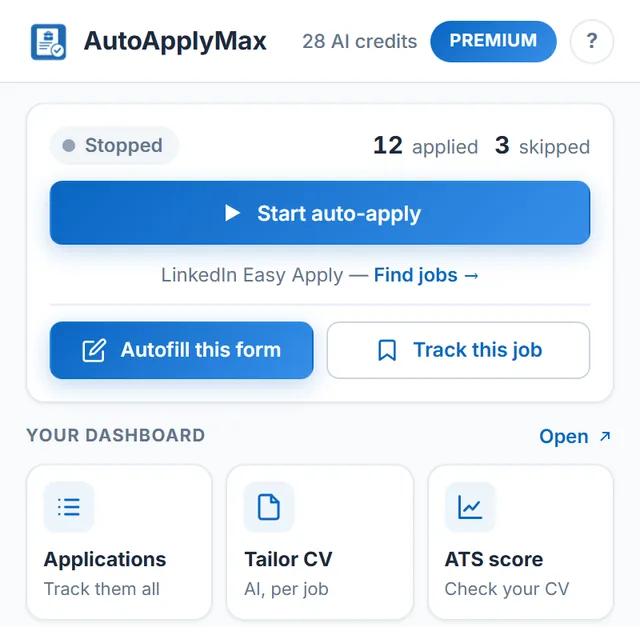
AutoApplyMax is a Chrome extension that auto-applies on LinkedIn Easy Apply (hands-off) and provides universal AI autofill on 100+ ATS portals — Indeed, Glassdoor, Welcome to the Jungle, Monster, Greenhouse, Workday, Lever and any company career page. On the autofill platforms you review and click Submit yourself, but every field is pre-filled from your profile.
Key Features
- Auto-apply on LinkedIn Easy Apply — hands-off, up to 50 applications/hour; universal AI autofill on Indeed, Glassdoor, WTTJ, Monster, and any ATS portal
- AI resume tailoring — generates a tailored resume for each job description using AI
- AI cover letter writer — creates personalized cover letters in seconds
- ATS score checker — analyzes your resume against ATS systems before applying
- Application dashboard — track all applications with status, analytics, and filters
- Smart form filling — handles multi-step forms, dropdowns, file uploads, screening questions
Pricing
- Free: unlimited auto-apply + 1 AI credit/month (CV or cover letter)
- Premium: $6.99/month — adds AI Autofill on every form + 30 AI credits/month
- Unlimited: $22.99/month — unlimited AI generations + everything in Premium
Pros & Cons
Pros: Most platform support, cheapest premium tier, AI features included, free tier available
Cons: Newer tool (launched 2026), Chrome only
2. LazyApply — Best Known Auto-Apply Bot
Best for: Users who want a proven tool and don't mind paying more.
LazyApply is one of the oldest auto-apply tools. It supports LinkedIn, Indeed, and ZipRecruiter with automated form filling and submission.
Pricing
- Basic: $99/year (15 applications a day)
- Premium: $149/year (150 applications a day), Ultimate: $999/year (1,500 a day), billed yearly
- No free tier
Pros & Cons
Pros: Established brand, decent LinkedIn support
Cons: Expensive, no AI resume tailoring, no free tier, limited platform support
3. Simplify — Best Free Autofill (Not Auto-Submit)
Best for: Users who want form autofill but prefer to review and submit manually.
Simplify autofills job application forms but does not auto-submit. You still click "Submit" yourself. This gives you more control but is much slower than full auto-apply tools.
Pros & Cons
Pros: Free tier, works on external career pages, good autofill accuracy
Cons: Doesn't auto-submit, still requires manual clicking, no Indeed/Glassdoor support
4. LoopCV — Best for European Job Markets
Best for: Users targeting European job boards.
LoopCV is a web-based platform that searches job boards and auto-applies on your behalf (see our AutoApplyMax vs LoopCV comparison for a detailed breakdown). It works differently from Chrome extensions — you upload your CV and set criteria, and LoopCV applies via email or direct applications.
Pros & Cons
Pros: Works in background (no browser needed), European job board support
Cons: Less control over applications, email-based applying can feel impersonal, $29/mo minimum
5. Sonara — AI-First Approach
Best for: Users who want AI to find and apply to relevant jobs automatically.
Sonara uses AI to match your profile with jobs and auto-applies. It's more of an AI agent than a browser extension.
Pros & Cons
Pros: AI matching is accurate, hands-off experience
Cons: Less transparency on where it applies, $29/mo, limited customization
6. Massive — LinkedIn-Only Power Tool
Best for: Heavy LinkedIn users who only apply on LinkedIn.
Massive focuses exclusively on LinkedIn with features like AI question answering and application tracking. However, at $39/month with LinkedIn-only support, it's hard to justify over cheaper multi-platform alternatives.
Pros & Cons
Pros: Deep LinkedIn integration, AI question answering
Cons: LinkedIn only, most expensive option, no Indeed/Glassdoor
7. Teal — Best for Job Search Organization
Best for: Users who want a job search CRM more than auto-apply.
Teal is primarily a job tracking and resume building tool. It has limited auto-apply features but excels at organizing your job search with a Kanban-style board.
Pros & Cons
Pros: Great organization tools, AI resume builder, free tier
Cons: Limited auto-apply (mostly autofill), no bulk application support
Auto-apply, autofill or AI agent: the three kinds of tools
"Auto apply" is used for three different products. Knowing which one you are installing tells you how much control you keep and where it will work.
| Type | What it does | Who clicks Submit | On this list |
|---|---|---|---|
| Auto-apply browser extension | Runs in your own browser, opens each job, fills the form from your profile and submits it | The extension | AutoApplyMax (LinkedIn Easy Apply), LazyApply |
| Autofill extension | Fills the application form on job boards and company career sites from your profile | You, after reviewing | Simplify, Teal; AutoApplyMax on Indeed, Glassdoor, Workday, Greenhouse, Lever and other career sites |
| Cloud service or AI agent | Searches jobs and applies on your behalf from its own servers, by email or direct application | The service | LoopCV, Sonara |
A browser extension works with the account you are already signed into, so it never needs your password. With a cloud service, check what account access it asks for and where it applies before you connect anything.
Best free auto apply tools
Of the seven tools above, three have a free plan you can use for a real job search:
- AutoApplyMax (free plan): auto-apply on LinkedIn Easy Apply with no application cap set by us, autofill on other job sites, the application tracker, unlimited ATS checks, and 1 AI credit a month for a tailored resume or cover letter.
- Simplify (free tier): autofill on job boards and career pages; you submit each application yourself.
- Teal (free tier): job tracking and resume tools, with autofill rather than bulk applying.
LinkedIn still applies its own limits to how fast any account can apply. AutoApplyMax pauses only when LinkedIn shows a rate-limit message, then resumes, so the pace is set by LinkedIn rather than by the free plan.
How to auto apply to jobs, step by step
- Get your resume right first. Run it through a free resume checker and fix missing sections, dates and keywords. Every automated application sends this file.
- Install the extension and build your profile. Upload your resume; the profile it creates answers the common form fields (contact details, work authorization, years of experience, salary expectations).
- Search LinkedIn with the Easy Apply filter. Use a precise title and location, for example "Data Analyst" in Toronto, and sort by most recent.
- Start auto-apply and check the first applications. Open the tracker after the first few submissions and read the answers given to screening questions.
- Use autofill everywhere else. On Indeed, Workday, Greenhouse, Lever and company career sites, open the application, let the extension fill it, review it, and click Submit yourself.
- Tailor for the jobs you care most about. For a dream role, generate a resume tailored to that job description before applying instead of sending the generic version.
Step-by-step guides: how to auto apply on LinkedIn, LinkedIn apply bots explained and auto apply Chrome extensions compared.
How to Choose the Right Auto-Apply Tool
Consider these factors:
- Which platforms do you use? If you apply on Indeed + LinkedIn, check what each tool does outside LinkedIn (AutoApplyMax autofills Indeed forms for you to submit; LazyApply also covers Indeed)
- Do you want auto-submit or just autofill? Auto-submit saves the most time. Autofill (Simplify, Teal) still requires clicking
- Budget? AutoApplyMax has the cheapest premium tier ($6.99/mo). LazyApply starts at $99/year, billed yearly
- AI features? If you want AI-tailored resumes and cover letters, AutoApplyMax and Sonara are your options
- Free tier? Only AutoApplyMax, Simplify, and Teal offer meaningful free tiers
Looking for an alternative to one tool?
Our alternatives pages compare one tool with 5 to 7 others, with sourced prices checked November 4, 2026: LazyApply, Simplify, LoopCV, Jobright, JobCopilot, FastApply, OwlApply, JobWizard; and, checked November 6, 2026: AIApply, Teal, Huntr, Careerflow. For what is automated on each job site, see auto apply to jobs.
Comparing on price? See the cheapest auto-apply tools with a free plan, checked November 6, 2026.
Before you start applying, the free resume keyword scanner shows the keywords of a job description your resume is missing, and our page on AI that answers screening questions shows which tools fill them, on which plan, and who clicks Submit.
Frequently Asked Questions
What is the best auto-apply job tool in 2026?
AutoApplyMax is the best overall pick in 2026 — hands-off auto-apply on LinkedIn Easy Apply plus universal AI autofill on 100+ ATS portals (Indeed, Glassdoor, WTTJ, Monster, Greenhouse, Workday, Lever and any company career page). Includes AI resume tailoring and a free tier. LazyApply is a strong alternative but starts at $99/year (Basic plan, billed yearly).
Are auto-apply job tools worth it?
Yes. The average job seeker spends 11 hours per week on applications. Auto-apply and autofill tools can reduce this to under 1 hour while increasing the number of applications by 10x. Even free tiers offer significant time savings.
Can auto-apply tools work on Indeed and LinkedIn?
Only LinkedIn Easy Apply supports fully hands-off automation via AutoApplyMax. On Indeed, Glassdoor, WTTJ, Monster and every other ATS portal (100+), AutoApplyMax provides AI autofill — every field is pre-filled from your profile, but you review and click Submit yourself. Most competitors only support LinkedIn.
What is the best free auto apply tool?
For LinkedIn, AutoApplyMax: its free plan auto-applies to LinkedIn Easy Apply jobs, autofills forms on other job sites and tracks every application. If you only want help filling forms and prefer to submit each application yourself, Simplify and Teal also have free tiers.
Is there an app that applies to jobs for you?
Yes, in two forms. Browser extensions such as AutoApplyMax submit LinkedIn Easy Apply applications for you from your own browser. Cloud services apply from their own servers. On most other job sites and company portals, tools autofill the form and you click Submit.
Is auto applying to jobs a good idea?
It is a good idea for roles where you clearly match the posting and the application is a standard form. It works best with a strong base resume and precise searches. For the few jobs you want most, tailor your resume and cover letter to that posting instead of relying on bulk applications.
For detailed head-to-head comparisons, see our dedicated pages: AutoApplyMax vs LazyApply, AutoApplyMax vs Simplify, and AutoApplyMax vs LoopCV.
The Bottom Line
If you're serious about your job search, an auto-apply tool is no longer optional — it's essential. The market has matured significantly in 2025-2026, with more options and better AI features than ever.
For most job seekers, AutoApplyMax offers the best value: auto-apply on LinkedIn Easy Apply, universal autofill on other job sites, AI features, and a free tier to get started. Try it today.