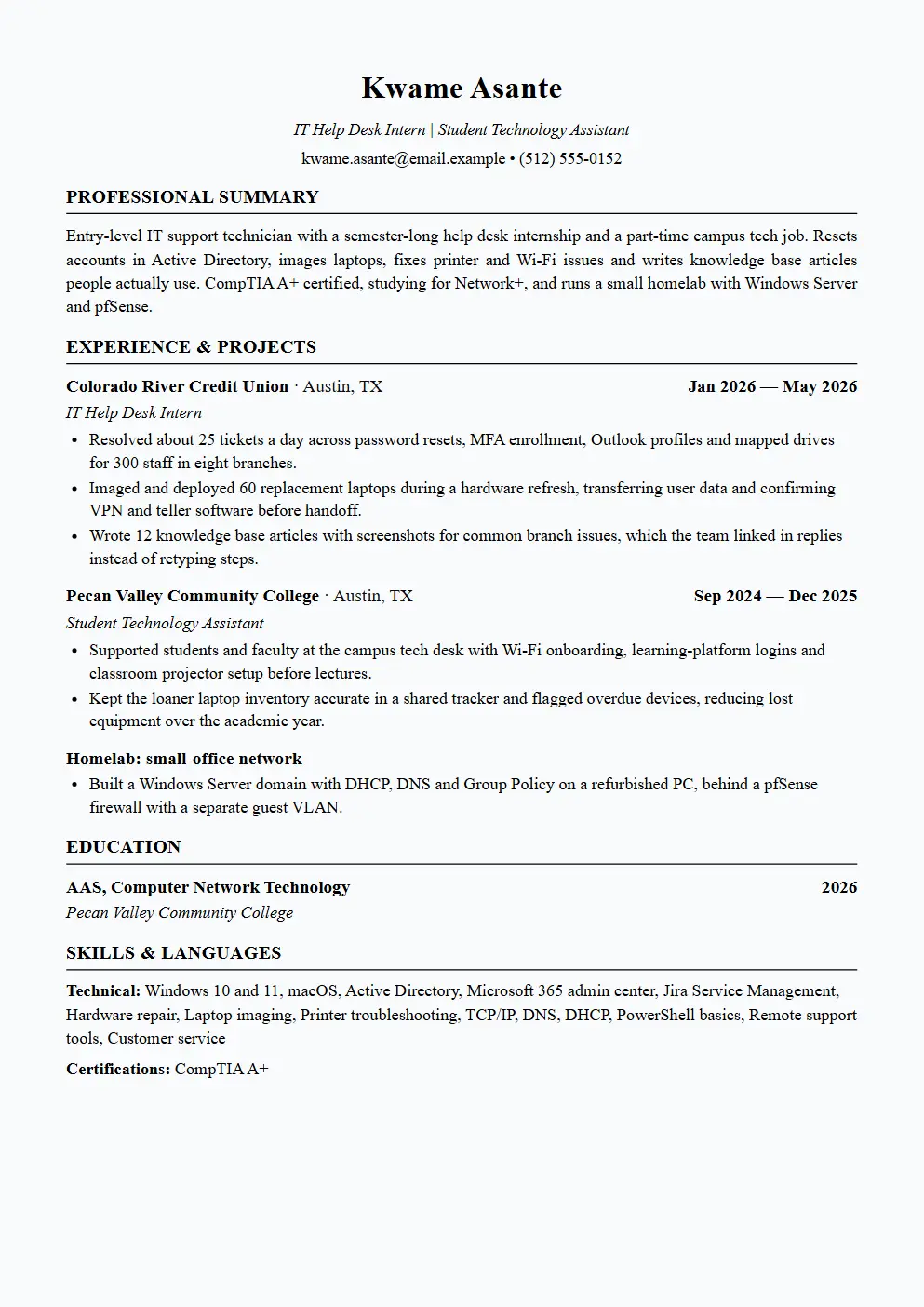
Kwame Asante: IT Help Desk Intern
Kwame's internship bullets use daily ticket volume, user count and a hardware refresh, the three things a help desk manager wants to see. The campus job shows he already deals with non-technical people under time pressure. His homelab sits in a projects section because it proves he understands DNS, DHCP and Group Policy beyond a certification exam.
Read this resume as text
Kwame Asante · Austin, TX · kwame.asante@email.example · (512) 555-0152
Summary
Entry-level IT support technician with a semester-long help desk internship and a part-time campus tech job. Resets accounts in Active Directory, images laptops, fixes printer and Wi-Fi issues and writes knowledge base articles people actually use. CompTIA A+ certified, studying for Network+, and runs a small homelab with Windows Server and pfSense.
Experience
IT Help Desk Intern, Colorado River Credit Union · Austin, TX · Jan 2026 — May 2026
- Resolved about 25 tickets a day across password resets, MFA enrollment, Outlook profiles and mapped drives for 300 staff in eight branches.
- Imaged and deployed 60 replacement laptops during a hardware refresh, transferring user data and confirming VPN and teller software before handoff.
- Wrote 12 knowledge base articles with screenshots for common branch issues, which the team linked in replies instead of retyping steps.
Student Technology Assistant, Pecan Valley Community College · Austin, TX · Sep 2024 — Dec 2025
- Supported students and faculty at the campus tech desk with Wi-Fi onboarding, learning-platform logins and classroom projector setup before lectures.
- Kept the loaner laptop inventory accurate in a shared tracker and flagged overdue devices, reducing lost equipment over the academic year.
Projects
Homelab: small-office network
- Built a Windows Server domain with DHCP, DNS and Group Policy on a refurbished PC, behind a pfSense firewall with a separate guest VLAN.
Education
AAS, Computer Network Technology, Pecan Valley Community College (2026)
Certifications
CompTIA A+
Skills
Windows 10 and 11, macOS, Active Directory, Microsoft 365 admin center, Jira Service Management, Hardware repair, Laptop imaging, Printer troubleshooting, TCP/IP, DNS, DHCP, PowerShell basics, Remote support tools, Customer service
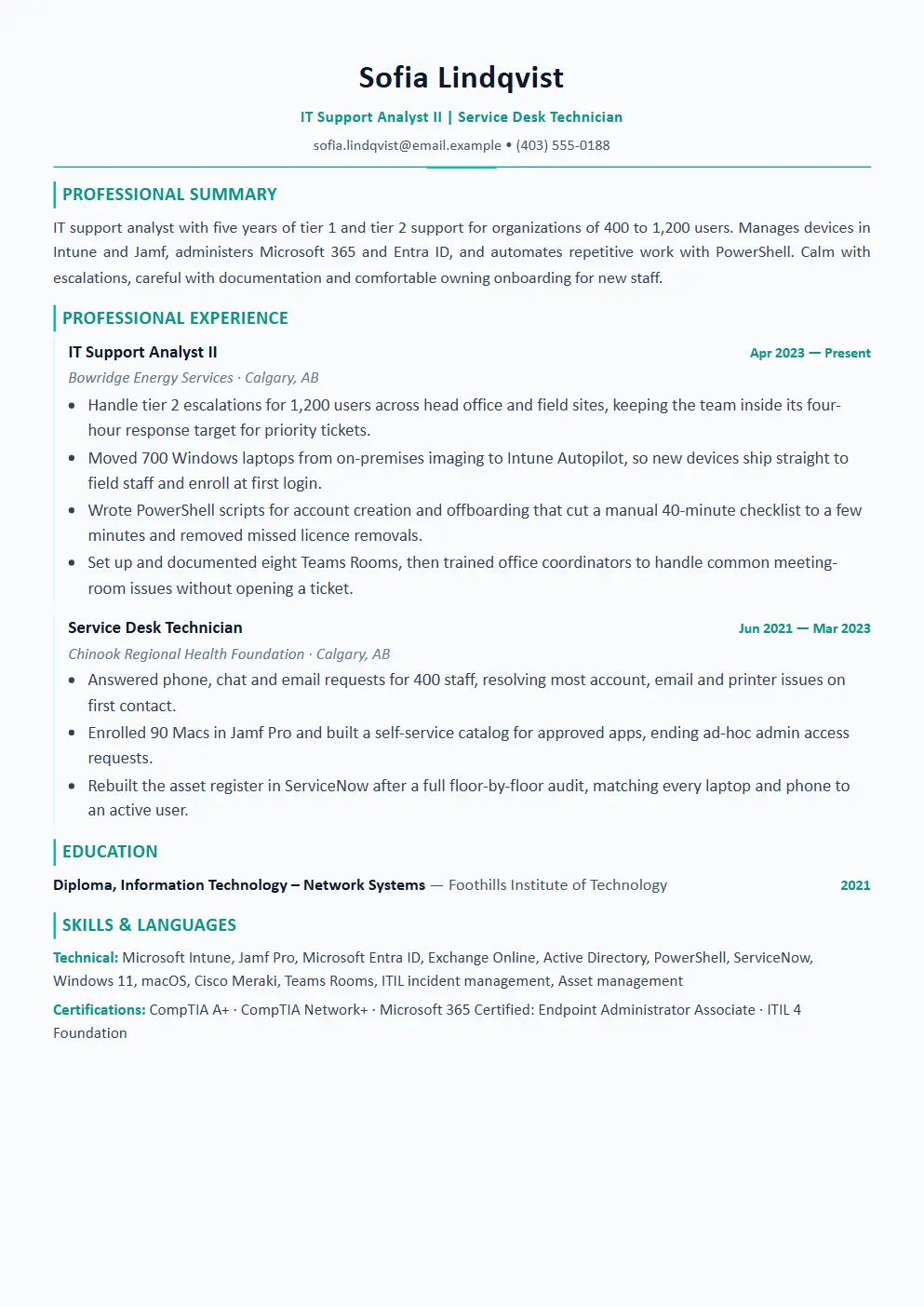
Sofia Lindqvist: IT Support Analyst II
Sofia's resume shows she has moved from answering tickets to removing them. Autopilot, PowerShell offboarding and Teams Rooms training each replace repeated manual work. Canadian spelling such as licence appears naturally, and her certifications are listed because Calgary postings often name A+, Network+ and Microsoft endpoint credentials as preferred.
Read this resume as text
Sofia Lindqvist · Calgary, AB · sofia.lindqvist@email.example · (403) 555-0188
Summary
IT support analyst with five years of tier 1 and tier 2 support for organizations of 400 to 1,200 users. Manages devices in Intune and Jamf, administers Microsoft 365 and Entra ID, and automates repetitive work with PowerShell. Calm with escalations, careful with documentation and comfortable owning onboarding for new staff.
Experience
IT Support Analyst II, Bowridge Energy Services · Calgary, AB · Apr 2023 — Present
- Handle tier 2 escalations for 1,200 users across head office and field sites, keeping the team inside its four-hour response target for priority tickets.
- Moved 700 Windows laptops from on-premises imaging to Intune Autopilot, so new devices ship straight to field staff and enroll at first login.
- Wrote PowerShell scripts for account creation and offboarding that cut a manual 40-minute checklist to a few minutes and removed missed licence removals.
- Set up and documented eight Teams Rooms, then trained office coordinators to handle common meeting-room issues without opening a ticket.
Service Desk Technician, Chinook Regional Health Foundation · Calgary, AB · Jun 2021 — Mar 2023
- Answered phone, chat and email requests for 400 staff, resolving most account, email and printer issues on first contact.
- Enrolled 90 Macs in Jamf Pro and built a self-service catalog for approved apps, ending ad-hoc admin access requests.
- Rebuilt the asset register in ServiceNow after a full floor-by-floor audit, matching every laptop and phone to an active user.
Education
Diploma, Information Technology – Network Systems, Foothills Institute of Technology (2021)
Certifications
CompTIA A+ · CompTIA Network+ · Microsoft 365 Certified: Endpoint Administrator Associate · ITIL 4 Foundation
Skills
Microsoft Intune, Jamf Pro, Microsoft Entra ID, Exchange Online, Active Directory, PowerShell, ServiceNow, Windows 11, macOS, Cisco Meraki, Teams Rooms, ITIL incident management, Asset management
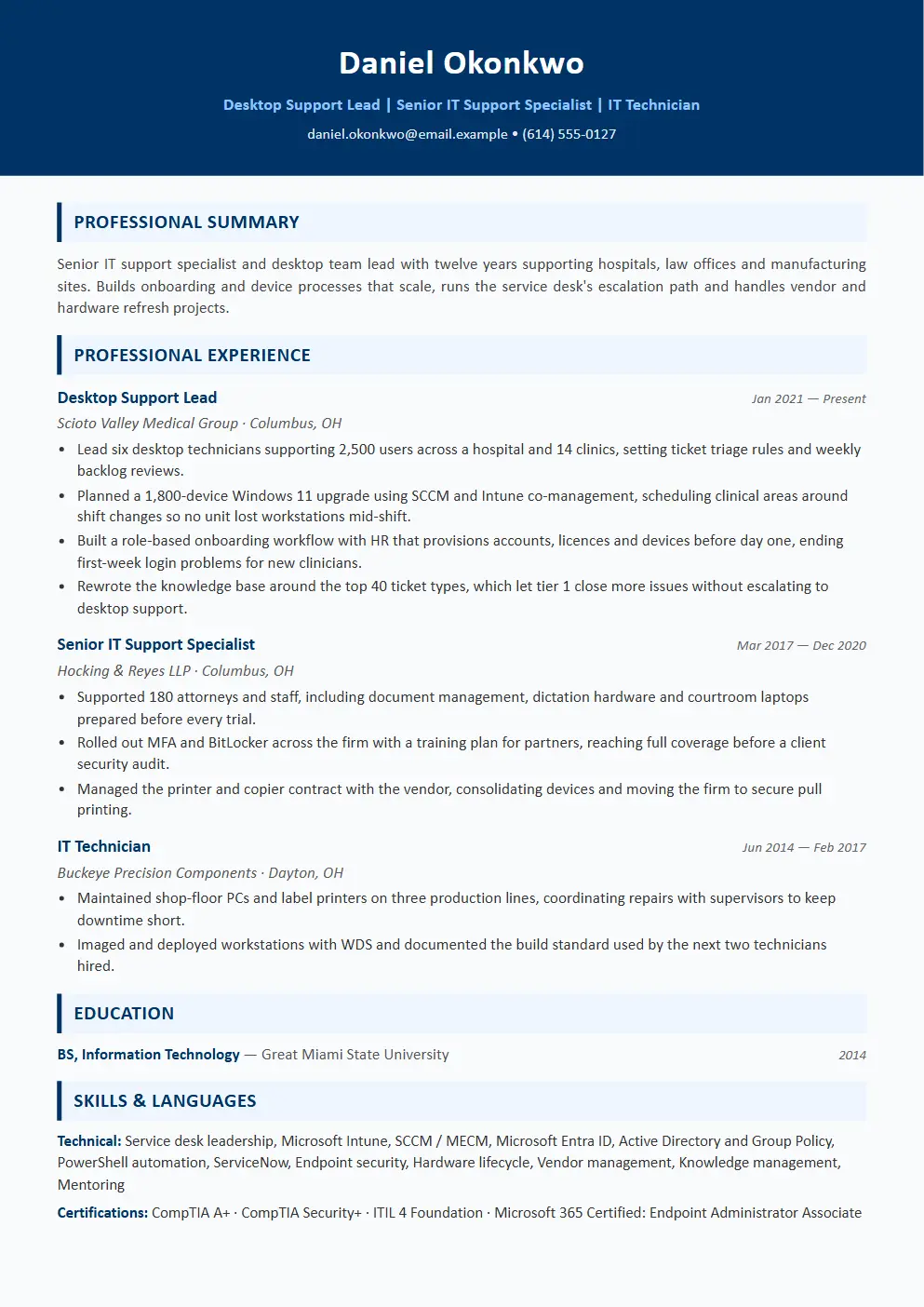
Daniel Okonkwo: Desktop Support Lead
Daniel's bullets mix leadership, large rollouts and processes built with other departments. Healthcare and legal details show he understands environments where downtime has real consequences. His first role is short and focused on a build standard, because a lead role is decided by his last eight years, not by his earliest repairs.
Read this resume as text
Daniel Okonkwo · Columbus, OH · daniel.okonkwo@email.example · (614) 555-0127
Summary
Senior IT support specialist and desktop team lead with twelve years supporting hospitals, law offices and manufacturing sites. Builds onboarding and device processes that scale, runs the service desk's escalation path and handles vendor and hardware refresh projects. Hands-on with Intune, SCCM, Entra ID and PowerShell, and mentors technicians toward tier 2 and systems roles.
Experience
Desktop Support Lead, Scioto Valley Medical Group · Columbus, OH · Jan 2021 — Present
- Lead six desktop technicians supporting 2,500 users across a hospital and 14 clinics, setting ticket triage rules and weekly backlog reviews.
- Planned a 1,800-device Windows 11 upgrade using SCCM and Intune co-management, scheduling clinical areas around shift changes so no unit lost workstations mid-shift.
- Built a role-based onboarding workflow with HR that provisions accounts, licences and devices before day one, ending first-week login problems for new clinicians.
- Rewrote the knowledge base around the top 40 ticket types, which let tier 1 close more issues without escalating to desktop support.
Senior IT Support Specialist, Hocking & Reyes LLP · Columbus, OH · Mar 2017 — Dec 2020
- Supported 180 attorneys and staff, including document management, dictation hardware and courtroom laptops prepared before every trial.
- Rolled out MFA and BitLocker across the firm with a training plan for partners, reaching full coverage before a client security audit.
- Managed the printer and copier contract with the vendor, consolidating devices and moving the firm to secure pull printing.
IT Technician, Buckeye Precision Components · Dayton, OH · Jun 2014 — Feb 2017
- Maintained shop-floor PCs and label printers on three production lines, coordinating repairs with supervisors to keep downtime short.
- Imaged and deployed workstations with WDS and documented the build standard used by the next two technicians hired.
Education
BS, Information Technology, Great Miami State University (2014)
Certifications
CompTIA A+ · CompTIA Security+ · ITIL 4 Foundation · Microsoft 365 Certified: Endpoint Administrator Associate
Skills
Service desk leadership, Microsoft Intune, SCCM / MECM, Microsoft Entra ID, Active Directory and Group Policy, PowerShell automation, ServiceNow, Endpoint security, Hardware lifecycle, Vendor management, Knowledge management, Mentoring
Tailor this resume to a job in 30 seconds
Paste a real IT support specialist posting and AutoApplyMax rewrites your own resume for it: same facts, reordered and rephrased around what that employer asks for. The free plan includes 1 tailored resume a month.
How to write each section of a IT support specialist resume
Header and headline
List your name, city, phone, email and LinkedIn. If you have a homelab write-up, a GitHub repository of PowerShell scripts or a blog about fixes you documented, link one of them; it gives a hiring manager something to look at before the interview.
Match the headline to the level in the posting: Help Desk Technician, IT Support Specialist, Desktop Support Analyst or Service Desk Lead. Mention a shift preference or availability for on-call work only if the posting asks.
Summary
State your support tier, the size of the user base you support, and the platforms you manage: Windows, macOS, Microsoft 365, Google Workspace, Intune, Jamf or Active Directory. Add one line about the environment, such as healthcare, schools, retail branches or law offices, because each comes with its own pressures.
Career changers from retail or call centers should name that customer-facing background; it is a real strength on a service desk when paired with a certification and lab work.
Experience
Useful numbers include users supported, sites, tickets per day, devices deployed, response or resolution targets and the size of a migration. Name the ticketing system and the tools you used to fix things, because those words often decide whether your resume is found in a search.
Show work that removed tickets, not only work that closed them: scripts, self-service portals, knowledge base articles, better onboarding. Those lines are what move you from tier 1 to tier 2 and beyond.
Certifications and homelab
Place certifications high on the page if you have little experience. CompTIA A+ is the usual starting point, with Network+ and Security+ next; Microsoft endpoint and ITIL credentials suit analysts in larger organizations. List the full name and do not include exams you have only scheduled, unless you mark them as in progress with a target date.
A homelab belongs in a projects section. Describe what you built in one or two lines: a domain controller, DHCP and DNS, Group Policy, a firewall with VLANs, a backup job. Keep it to what you could explain in an interview.
Skills and education
Group skills into operating systems, identity and device management, service desk tools, networking basics and scripting. Avoid listing every Microsoft Office application; employers assume it unless you administer it.
Education can be a college diploma, an associate degree, a bachelor's or self-study plus certifications; support roles hire from all of them. List the program and year, and add relevant coursework only if you have no IT work experience yet.
IT Support Specialist resume summary examples
Entry-level objective: CompTIA A+ certified IT student seeking a help desk technician role in a multi-site organization. Brings internship experience with Active Directory, Microsoft 365 and laptop imaging, plus a homelab running Windows Server and a pfSense firewall.
It names the setting and backs the request with three concrete tools, which matters when a manager has stacks of first-job applications.
New-grad summary: Help desk technician with a semester internship supporting 300 credit union staff. Handles password and MFA issues, Outlook problems, printer faults and hardware swaps, and writes clear knowledge base articles. Patient with non-technical users and fast to document fixes.
Leads with the user base supported and the ticket types handled, then adds the people skills that support roles depend on.
Mid-level summary: IT support analyst with five years of tier 1 and tier 2 support for up to 1,200 users. Manages Windows and Mac fleets in Intune and Jamf, administers Microsoft 365 and Entra ID, and uses PowerShell to automate onboarding and offboarding.
Platforms, scale and automation fit into two sentences, and automation is what separates a mid-level analyst from an entry technician.
Senior summary: Desktop support lead with twelve years in hospitals, law firms and manufacturing. Runs a team of six, plans large Windows and device migrations around operational schedules and builds onboarding processes with HR. Still writes the PowerShell and Intune policies the team deploys.
Shows team size and project scope first, then proves the lead remains technical, which is what most support managers want.
IT Support Specialist resume bullet examples: weak vs strong
The strong versions use made-up figures for a fictional candidate. Replace them with your own real numbers, or describe the scope (team size, volume, frequency) if you have none.
Volume, scope and first-contact resolution show workload and skill together.
Names the platform and the change in process, not only the act of unboxing hardware.
Automation counts when it saves time and prevents mistakes that cost money or create security gaps.
Security work in support is mostly adoption; showing the training and deadline proves you managed people, not only settings.
Ties writing to a service desk outcome that managers already track.
Shows cross-department work and the user experience on day one, which leadership notices.
Specifies the tool and the result, turning a dull task into evidence of reliability.
Team size, user base and the routine you introduced explain what kind of lead you are.
Keywords from live IT support specialist job postings
We read 202 live IT support specialist postings (41 US and 161 Canadian) from our job feed on October 14, 2026 and counted how many mention each skill, tool or credential. A posting counts once per term, wherever it appears in the title or description. Use the list to check your resume for gaps that are real for you, not as a checklist.
| Keyword | Postings | |
|---|---|---|
| Troubleshooting | 144 of 202 (71%) | |
| Hardware support | 130 of 202 (64%) | |
| Ticketing system | 106 of 202 (52%) | |
| Documentation / knowledge base | 103 of 202 (51%) | |
| Help desk | 92 of 202 (46%) | |
| Customer service | 92 of 202 (46%) | |
| Microsoft 365 | 78 of 202 (39%) | |
| Printers | 71 of 202 (35%) | |
| Tier 1 / Tier 2 | 53 of 202 (26%) | |
| Active Directory | 50 of 202 (25%) | |
| Onboarding / offboarding | 48 of 202 (24%) | |
| Windows 10/11 | 45 of 202 (22%) | |
| Service desk | 40 of 202 (20%) | |
| SLA | 38 of 202 (19%) | |
| Microsoft Entra ID / Azure AD | 37 of 202 (18%) | |
| CompTIA A+ | 32 of 202 (16%) | |
| Intune | 31 of 202 (15%) | |
| macOS | 30 of 202 (15%) | |
| Exchange Online | 29 of 202 (14%) | |
| DNS / DHCP | 27 of 202 (13%) | |
| VPN | 26 of 202 (13%) | |
| Bilingual | 23 of 202 (11%) |
Source: 202 unique postings whose title matches the role, from the WhatJobs publisher feed (US and Canada), collected October 14, 2026. Duplicate reposts were counted once. Counts change daily; a term not listed may still matter for a specific employer.
Skills for a IT support specialist resume
Operating systems and hardware
- Windows 10 and 11
- macOS
- iOS and Android
- Linux basics
- Laptop and desktop repair
- Printers and peripherals
Mention fleet size or device types when you can; it tells a reader what scale you handle.
Identity, email and device management
- Active Directory
- Microsoft Entra ID
- Microsoft 365 admin
- Exchange Online
- Intune
- Jamf Pro
- SCCM / MECM
These are the most searched terms in support postings; back each with a bullet.
Networking and security basics
- TCP/IP
- DNS and DHCP
- VPN clients
- Wi-Fi troubleshooting
- MFA
- BitLocker or FileVault
Enough to diagnose and escalate well; deep network design belongs on a network engineer resume.
Service desk tools and scripting
- ServiceNow
- Jira Service Management
- Zendesk
- Remote support tools
- PowerShell
- ITIL practices
Name the ticketing tool you used and show one example of scripting or process improvement.
Soft skills, and how to prove them
- Patience with frustrated users: Describe a high-pressure fix, such as a clinician locked out before a shift, and how you kept the person informed while you worked.
- Plain-language explanation: Point to knowledge base articles, how-to guides or training sessions that non-technical staff used successfully.
- Prioritization: Explain how you triaged a queue during an outage or busy Monday, and how priority tickets stayed within their target.
- Ownership: Show a recurring issue you tracked to its root cause and fixed for good instead of closing the same ticket again.
- Teamwork: Mention escalations you documented well, shift handoffs you improved or technicians you trained.
Certifications and licenses
- CompTIA A+ (CompTIA): The standard entry credential for help desk and desktop support, covering hardware, operating systems, troubleshooting and basic security.
- CompTIA Network+ (CompTIA): Useful once you handle connectivity issues across sites, and a common step toward network administration.
- CompTIA Security+ (CompTIA): Often required for US Department of Defense and contractor IT roles under DoD 8140, and valued for support staff handling security tasks.
- Microsoft 365 Certified: Endpoint Administrator Associate (Microsoft): Shows Intune, Windows deployment and device policy skills that many corporate support analyst roles ask for.
- ITIL 4 Foundation (PeopleCert (Axelos)): Common in larger organizations that run incident, request and change management by ITIL practices.
Looking for low-cost options? See our list of free certifications in this field.
US vs Canada: IT support specialist resumes and pay
United States
In the US, IT support titles are unregulated and vary widely: Help Desk Technician, IT Support Specialist, Desktop Support Technician and Service Desk Analyst can describe similar work. Defense contractors and federal roles may require Security+ or another approved certification and sometimes a security clearance, so list those clearly if you have them. Healthcare employers often value HIPAA awareness, and school districts may require a background check. Do not include a photo, date of birth or marital status.
| BLS occupation | 10th pct. | Median | 90th pct. |
|---|---|---|---|
| Computer User Support Specialists (SOC 15-1232) | $40,980 | $61,860 | $100,540 |
Annual wages, US national, BLS Occupational Employment and Wage Statistics, May 2025.
Canada
Canadian postings use similar titles, plus Computer Help Desk Agent and IT Technician, and follow Canadian spelling such as licence and centre. Bilingual English and French support is a real advantage in Ottawa, Quebec, New Brunswick and federal government roles, and some Quebec employers require French for daily work. Federal government IT positions often require Reliability Status or a higher security screening. College diplomas in network or computer systems technology are a common entry path. State your work authorization if you are not a citizen or permanent resident.
| Job Bank occupation | Low | Median | High |
|---|---|---|---|
| Help Desk Specialist (NOC 22221) | $20.50/h | $31.47/h | $49.00/h |
Canada-wide wages in CAD, Job Bank (Government of Canada), reference period 2023-2024. Provincial figures differ; follow the link for your province.
Check your IT support specialist resume before you apply
The free ATS checker compares your resume with a real job description and lists the keywords you are missing. No signup needed for the scan.
FAQ
Can I get an IT support job without experience?
Yes, many people start that way. Combine a certification such as CompTIA A+ with a homelab project, any customer service history and campus or volunteer tech work. Describe those experiences with the same specifics you would use for a paid job: users helped, devices set up and problems solved.
Should I include a homelab on my resume?
Include it when you have little professional IT experience or when it shows skills your job does not, such as running a domain controller, setting up VLANs or scripting backups. Keep it to one or two lines and make sure you can explain every part of it in an interview.
What ticket metrics should I list?
Use the numbers your team actually tracked: tickets per day or week, first-contact resolution, response or resolution targets met, customer satisfaction scores and backlog size. If your team did not track them, describe the scale instead, such as users, sites and device counts. Never estimate a metric you cannot explain.
Is a degree required for IT support?
Usually not. Many employers accept a college diploma, associate degree or certifications plus experience. Some larger employers and government roles list a degree as preferred, and it can matter for later moves into systems or security roles. Place education after experience once you have a year or more of support work.
How do I move from help desk to a system administrator role?
Show work beyond tickets: PowerShell scripts, Intune or Group Policy changes, server tasks you were trusted with, and projects such as migrations. Add a relevant certification and describe homelab servers you maintain. Then target titles like Systems Support Analyst or Junior Systems Administrator as a bridge.