LinkedIn Easy Apply · free Chrome extension

LinkedIn auto apply: dozens of Easy Apply jobs a day, on autopilot

Run a LinkedIn job search, click Start. The extension applies to Easy Apply jobs for you and logs every application.

  • Hands-off applying: it clicks Easy Apply, fills the form from your profile and attaches your resume.
  • AI answers screening questions like years of experience or salary from your real profile (Premium).
  • Pauses on LinkedIn rate limits and picks up where it stopped. Every application lands in your tracker.

Free on every plan · LinkedIn Easy Apply only

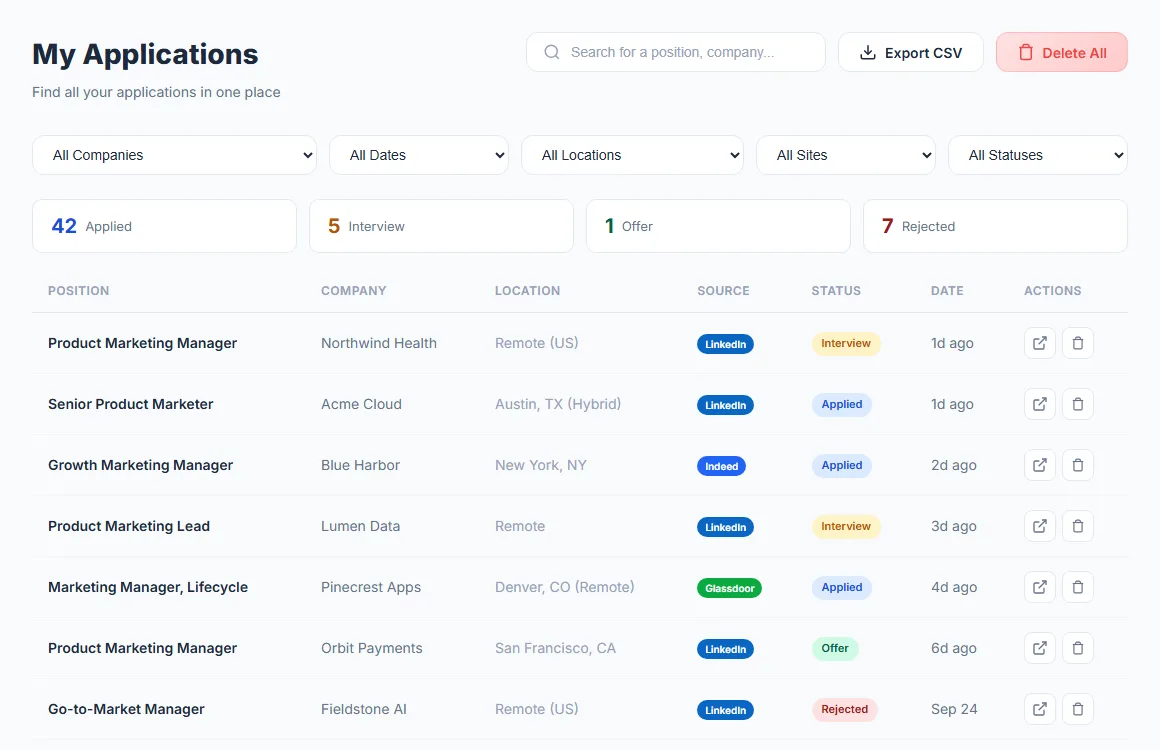
AutoApplyMax application tracker listing jobs applied to through LinkedIn Easy Apply, Indeed and Glassdoor, with status and date
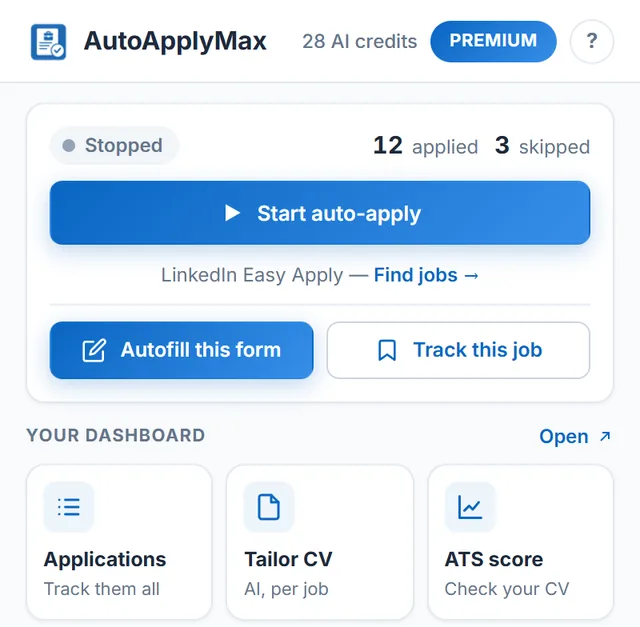
AutoApplyMax extension popup with the Start auto-apply button showing 12 jobs applied

How to start auto-applying on LinkedIn in 60 seconds

Set it up once, then the extension does the repetitive part.

  1. 1

    Sign up free

    Upload your resume and save the answers LinkedIn forms ask for: years of experience, salary, work authorization.

  2. 2

    Install the Chrome extension

    Add it from the Chrome Web Store and sign in with the same account.

  3. 3

    Search, then click Start auto-apply

    Run a LinkedIn job search with the Easy Apply filter, open the extension popup and click "Start auto-apply".

What the extension does on LinkedIn

The free AutoApplyMax Chrome extension applies to LinkedIn Easy Apply jobs for you while you get on with your day. It clicks Apply, fills in the form from your profile (Premium adds AI answers to screening questions), attaches your resume and logs every application: dozens of applications a day, with no repetitive clicking or typing. Want a different resume for each role? Make a tailored resume per role first.

What auto-apply on LinkedIn actually does

The extension handles the clicks; you stay in control. For every batch you launch, you can see which jobs it applied to, in real time.

Easy Apply jobs only

Auto-apply only runs on jobs with LinkedIn's native Easy Apply button. It skips "Apply on company website" postings, which need a captcha or a new account, so it never submits half-finished forms on external sites.

Human-paced, with automatic pauses

Random delays between applications. If LinkedIn shows a rate-limit warning, the extension waits a few minutes and then picks up where it left off.

AI answers screening questions (Premium)

"Years of Java?" "US work authorization?" "Salary expectations?" — with Premium the AI reads your profile and answers in seconds. On the Free plan the extension uses the answers saved in your profile.

Every application logged

Your application tracker fills itself: company, role, location, date and source. Update statuses as recruiters reply, with no spreadsheet to maintain.

Beyond auto-apply: the rest of the toolkit

Auto-apply covers LinkedIn Easy Apply. The same account and extension handle the rest of the application, before and after you hit Apply.

Application tracking

Every application in one job application tracker: LinkedIn auto-applies are logged automatically, and you move each one from Applied to Interview to Offer.

Universal autofill everywhere else

On Indeed, Glassdoor, Workday, Greenhouse, Lever and company career sites, job application autofill fills the form from your profile. You review it and click Submit yourself.

AI resume tailoring

Paste a job description and the AI resume builder rewrites your real experience around its keywords, then exports an ATS-readable PDF.

ATS score checker

Before a batch, run your resume against a posting in the free ATS score checker: score, missing keywords and formatting issues.

Cover letters

For roles that ask for one, the AI cover letter generator drafts a letter from your profile and the job description, ready to edit.

Every feature in one place

Resume translation, resume checker, salary calculator and the rest: see all AutoApplyMax features.

How LinkedIn auto-apply works (and where it can't help you)

LinkedIn's Easy Apply flow lets a candidate submit a job application inside LinkedIn without leaving the platform. Behind the scenes it's a short web form — usually 2 to 6 steps — asking for your resume, contact info, and a handful of role-specific screening questions ("years of experience with X?", "authorization to work in Y?"). AutoApplyMax's Chrome extension automates that exact flow: it clicks the button, fills in the form from your saved profile, answers the screening questions (from your saved answers, or with AI on Premium), attaches your resume and submits, then moves on to the next Easy Apply job in your search results. This is what "auto-apply on LinkedIn" really means. It works on any LinkedIn Easy Apply job — engineering, product, marketing, sales, finance, healthcare, HR, entry-level, senior. No job type is excluded, because the form is LinkedIn's, not ours.

Why auto-apply only works on LinkedIn Easy Apply

Every other job board (Indeed, Glassdoor, Workday, Greenhouse, Lever, Ashby, iCIMS, Taleo, and 100+ company career sites) uses its own custom form, its own captcha, its own account requirement. There is no universal "one-click apply" outside LinkedIn. AutoApplyMax handles those with autofill: the extension fills in the form from your profile (and, with Premium, answers the screening questions with AI), then leaves the Submit button to you. You never retype your address and phone number again, and you keep the final say on each application.

Is auto-applying on LinkedIn safe? Will I get banned?

LinkedIn's terms are aimed at scraping and spam. AutoApplyMax does neither: it clicks the same buttons you would, at a human pace (random delays between actions), on jobs you searched for yourself. It never scrapes profiles, never sends connection requests and never posts on your behalf. When LinkedIn signals that you are going too fast, the extension backs off and waits instead of pushing through. As with any automation, you use it at your own discretion.

How to make LinkedIn auto-apply actually land interviews

Auto-applying to 50 jobs a day with a mediocre resume gets you 50 rejections. Two rules turn that volume into interviews:

Free vs Premium — what changes for auto-apply

Auto-apply on LinkedIn Easy Apply is 100% free with the AutoApplyMax extension — no cap on how many jobs you apply to, no daily limit beyond LinkedIn's own. Premium ($6.99/month) adds AI answers to LinkedIn screening questions, AI autofill on 100+ portals outside LinkedIn, 30 AI credits a month for tailored resumes and cover letters, and the AI Career Audit, which points out what to fix in your profile first. If you only apply through LinkedIn Easy Apply and your saved answers are enough, you never need to pay.

Related: auto apply to jobs with AutoApplyMax (the AI job application assistant, from tailored resume to auto-apply), autofill job applications on Indeed, Workday, Greenhouse, Lever and 100+ ATS portals (you click Submit), and every AutoApplyMax feature.
Auto-apply on LinkedIn: FAQ

Is auto-apply on LinkedIn safe?

The extension only works on LinkedIn Easy Apply jobs from searches you run yourself, with human-like pauses between actions. It never scrapes profiles, never messages recruiters and never posts on your behalf. If LinkedIn shows a rate-limit warning, the extension waits a few minutes and then resumes on its own.

How many jobs can it apply to per day?

AutoApplyMax sets no cap of its own. LinkedIn limits how many Easy Apply submissions an account can send: in our measurements it slows an account down after about 15 quick applications (the extension pauses a few minutes, then resumes on its own). Screening questions are answered from your saved profile (with AI on Premium), so the extension never stops mid-application to ask you.

Does it work outside LinkedIn?

Auto-apply works on LinkedIn Easy Apply only. On other sites (Indeed, Glassdoor, Workday, Greenhouse, Lever, Ashby and 100+ more), the extension autofills the form from your profile, and with Premium AI answers the screening questions, but you press Submit yourself.

Do I need a tailored resume for each application?

It helps a lot, which is why AutoApplyMax includes an AI resume builder. Before an auto-apply batch, open a LinkedIn job and click 'Tailor my CV to this job' in the extension: the AI reads the job description and rewrites your resume around the role's must-have keywords.

Is the extension really free?

Yes. Auto-apply on LinkedIn Easy Apply is free and unlimited on the free plan. Premium ($6.99/month) adds AI answers to LinkedIn screening questions, AI autofill on 100+ portals outside LinkedIn, 30 AI credits a month for tailored resumes and cover letters, and the AI Career Audit.

How to set up LinkedIn auto apply, step by step

  1. Sign up free and upload your resume. The extension answers Easy Apply questions from your profile, so the more complete it is, the fewer jobs it has to skip.
  2. Fill in your application details. Years of experience, expected salary, notice period, work authorization, visa sponsorship, relocation, driver's license. You can set them in the extension popup or in the "Application details" card of your dashboard; the two stay in sync.
  3. Save your resume PDF in the popup. That is the file attached to every Easy Apply form. If you target two kinds of roles, run them as two batches with two resumes.
  4. Run a LinkedIn job search with the Easy Apply filter on (linkedin.com/jobs/search/?f_AL=true), plus your title, location, remote and date-posted filters. The search is the targeting: auto-apply only goes through the jobs in it.
  5. Click "Start auto-apply" in the extension popup and keep the tab open. You can follow each application live and stop at any moment.
  6. Check your tracker in the evening. Every application sent is logged in your job application tracker with company, role, location and date.

LinkedIn Easy Apply limits per day: what we measured

LinkedIn confirms that it applies "daily and speed restrictions" to Easy Apply submissions, in its own words to "foster more intentional job searches, ensure fairness by curbing automation and bots" (LinkedIn Help: Apply to jobs directly on LinkedIn). It does not publish the exact numbers, so we measured them on one live account on October 8, 2026:

LimitWhat we sawWhat the extension does
Speed limitThrottled after about 16 applications in 8 minutesPauses for a few minutes instead of pushing through
Throttle durationLifted in under 7 minutesResumes on its own where it stopped

One account on one day is a measurement, not a guarantee: LinkedIn can change these thresholds, and they may differ between accounts. The extension handles these limits for you, and they are the same on every AutoApplyMax plan.

Is LinkedIn auto apply allowed? The honest answer

LinkedIn's help center says it does not permit "browser plug-ins, or browser extensions that scrape, modify the appearance of, or automate activity on LinkedIn's website", and that members who break this rule "risk having their accounts restricted or shut down" (Prohibited software and extensions; see also section 8.2 of the User Agreement). Any auto-apply extension, AutoApplyMax included, automates clicks, so there is a real risk of a restriction even when the tool stays slow and polite. How to keep that risk low:

How the extension answers Easy Apply screening questions

AutoApplyMax never stops in the middle of an application to ask you something; it decides every field. The rules are fixed so you can predict what recruiters will see:

LinkedIn Easy Apply not working? Common causes

Easy Apply vs applying on the company website

LinkedIn Easy ApplyCompany website (ATS)
Time per applicationA few steps inside LinkedIn, automatableOften an account, several pages, custom questions
What the recruiter getsYour resume, answers and LinkedIn profile, sent to the job posterYour resume and answers in their ATS, exactly as they designed the form
TailoringSame resume for a batch, unless you switch filesEasy to attach a resume and cover letter made for that job
Best forVolume on roles you match wellYour top-choice employers
AutoApplyMaxAuto-apply (submits for you)Autofill (you click Submit)

A simple split works well: auto-apply to the broad search every morning, then spend the time you saved on three or four company-site applications with a tailored resume and cover letter. More in our guide to Easy Apply vs external applications.

LinkedIn auto apply tools compared

Prices checked October 2026 on each vendor's pricing page.

ToolFree planPaid plansWhat it does on LinkedIn
AutoApplyMaxUnlimited auto-apply on Easy Apply (within LinkedIn's limits), autofill on other sites, tracker, 1 AI credit a monthPremium $6.99/month or $49.90 lifetime; Unlimited $22.99/month (plans)Auto-applies to Easy Apply jobs from your search
LazyApplyNo free planBasic $99/year (15 applications a day), Premium $149/year (150 a day), Ultimate $999/year (lazyapply.com/pricing)Automated applying
HuntrUnlimited application autofills, track up to 100 jobsPro $40/month or $90 every 3 months (huntr.co/pricing)Tracker and autofill, not an auto-apply bot
Open-source bots (GitHub)FreeNoneScripts you install and run yourself; most need your LinkedIn credentials in a config file and break when LinkedIn changes its pages

Whatever you choose, LinkedIn's limits apply to everyone: compare tools on answer quality, tracking and price, not on "applications per day". Detailed comparisons: AutoApplyMax vs LazyApply, vs Huntr, and our LinkedIn auto-apply tools comparison.

More questions about LinkedIn auto apply

What is the LinkedIn Easy Apply limit per day?

LinkedIn confirms it applies speed restrictions to Easy Apply but does not publish the numbers. On one account on October 8, 2026, we saw a slowdown after about 16 applications in 8 minutes, lifted in under 7 minutes. AutoApplyMax pauses when LinkedIn slows you down and resumes on its own.

Is there a free LinkedIn auto apply extension?

Yes. Auto-apply on LinkedIn Easy Apply is free on every AutoApplyMax plan, with no cap of our own. Premium ($6.99/month) adds AI-written answers to open screening questions and 30 AI credits a month for tailored resumes and cover letters.

Can LinkedIn restrict my account for using auto apply?

Yes, it can. LinkedIn's help center says it does not permit extensions that automate activity on its site and that accounts which do risk being restricted or shut down. Staying under LinkedIn's limits, using one tool at a time and never sharing your password lowers the risk, but no auto-apply tool can remove it.

What's the difference between a LinkedIn auto apply bot and an extension?

A "bot" from GitHub is usually a script you run yourself, often with your LinkedIn email and password in a config file. A Chrome extension like AutoApplyMax runs inside the LinkedIn tab you are already signed in to, never sees your password, and logs each application to your tracker.

Why is LinkedIn Easy Apply not working?

The usual causes: the job sends you to the company website (not Easy Apply), you reached LinkedIn's daily limit, no resume is saved, or LinkedIn changed its page. Check the job has the Easy Apply button, save your resume in the extension and keep the extension updated.

Does LinkedIn Easy Apply actually work?

Yes, it is a normal application channel: LinkedIn sends your application to the job poster. Results depend on how well your resume matches the role, which is why targeting the search and tailoring your resume matter more than raw volume.

Is this a LinkedIn Easy Apply automation tool?

Yes, for Easy Apply jobs. Run a LinkedIn job search and click Start: the extension clicks Easy Apply, fills the form from your profile, attaches your resume and submits, and pauses when LinkedIn rate-limits you. Jobs that send you to a company website are not auto-applied; there the extension autofills the form and you click Submit.