In short
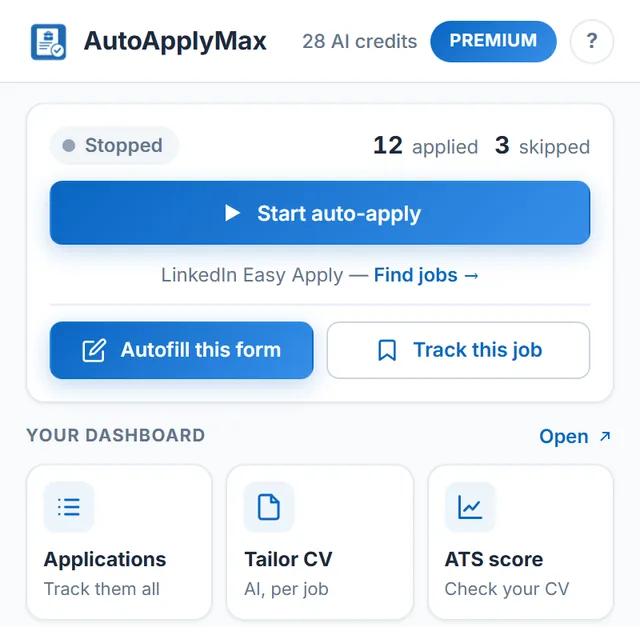
You can automate the repetitive part of job applications, not the judgment. With AutoApplyMax, a free Chrome extension, LinkedIn Easy Apply applications are submitted for you while it respects LinkedIn's application limits; on Indeed, Workday, Greenhouse, Lever and company career sites the form is autofilled from your profile and you click Submit. Every application lands in your job tracker.
Choosing which jobs to target and tailoring your resume for the best ones stays your call. The resume keyword scanner shows the keyword gap for free, and the AI resume builder rewrites your resume for a posting (1 free AI credit a month).
Only need the forms filled? The job application autofill extension fills Workday, Greenhouse, Lever, Indeed and 100+ other ATS forms from your profile, and you review and click Submit.
- Job seekers spend an average of 11 hours per week on applications -- automation can reduce repetitive form-filling from 30 minutes to 30 seconds per application.
- Candidates who apply to 50+ positions per week are 3x more likely to receive interview invitations (LinkedIn Economic Graph, 2025).
- Browser extensions like AutoApplyMax are the most effective automation category because they work within your real profile: auto-apply on LinkedIn Easy Apply, autofill on Indeed and other platforms.
- Automation should complement strategy, not replace it -- use filters to target relevant roles and reserve manual effort for top-priority applications.
The modern job market moves fast. In 2026, the average corporate job posting receives over 250 applications within the first 48 hours (according to Glassdoor employer data). If you are still applying to each position manually, filling out the same fields over and over, you are falling behind candidates who have learned to automate job applications effectively -- especially in high-demand fields like software engineering where speed matters. The good news is that automation does not mean cutting corners. When done right, it means applying smarter, faster, and more consistently than ever before.
Auto apply for jobs: what can be automated on each site (2026)
"Auto apply" means different things on different sites. Here is what a browser extension like AutoApplyMax actually does on each one, so you know where applications are sent for you and where you still click Submit. The full answer, with the setup for each site, is on auto apply to jobs.
| Where you apply | What AutoApplyMax automates | What you still do |
|---|---|---|
| LinkedIn Easy Apply | Auto-apply: opens each job of your search, fills every step from your profile and submits the application. It respects LinkedIn's application limits (it paces itself, pauses on a rate-limit message and stops at the daily limit). | Set the search and filters, click "Start auto-apply", check the results. |
| Indeed, Glassdoor, Monster, Welcome to the Jungle | Autofill: fills the application form from your profile. | Review the form and click Submit. |
| Workday, Greenhouse, Lever and other ATS portals, company career sites | Autofill: fills contact details, work history, education and common questions (AI answers to open screening questions on Premium). | Review the form and click Submit. |
| Resume and cover letter | AI rewrites your resume or writes a cover letter for one job description, only from your real experience (1 free AI credit a month). | Paste the job description, review, download. |
| Tracking | Every application the extension sends or autofills is logged in your tracker. | Update the status when a company replies. |
How to auto apply for jobs in 5 steps
- Sign up free and upload your resume: it becomes your profile.
- Add the answers application forms ask for: years of experience, salary expectation, notice period, work authorization.
- Install the AutoApplyMax Chrome extension and sign in with the same account.
- On LinkedIn, run a job search with the Easy Apply filter and click "Start auto-apply". On any other job site, open the application and click "Autofill this form", then Submit.
- Open your tracker in the dashboard to see every application, and tailor your resume for the roles you care most about with the AI resume builder.
Why Automate Job Applications?
The case for automating your job search has never been stronger. Here are three reasons why thousands of job seekers are making the switch in 2026.
Save Hours Every Week
The average job seeker spends 11 hours per week filling out applications (Bureau of Labor Statistics). Most of that time goes into repetitive tasks: entering your name, uploading your resume, selecting the same dropdown options, and clicking through multi-step forms. When you automate job applications, you reclaim those hours for high-value activities like networking, interview preparation, and skill development. A tool that handles the repetitive clicks can compress 30 minutes of manual work into 30 seconds of automated action.
Increase Your Application Volume
Job searching is partly a numbers game. Studies show that candidates who apply to 50 or more positions per week are three times more likely to receive interview invitations compared to those who apply to fewer than 10 (LinkedIn Economic Graph, 2025). Automation makes it realistic to hit these numbers without burnout. Instead of grinding through five applications per evening, you can submit dozens while focusing your energy on tailoring cover letters for the roles that matter most.
Maintain Consistency
When you apply manually, fatigue sets in. By the twentieth application of the day, you are more likely to make typos, skip optional fields, or forget to attach documents. Automation removes human error from the equation. Every application is submitted with the same attention to detail as the first, ensuring that your profile is always presented in its best light.
Types of Job Application Automation Tools
Not all automation tools work the same way. Understanding the different categories helps you choose the right approach for your situation.
Browser Extensions
Browser extensions are the most popular category of job application automation tools in 2026. They work directly within your browser, detecting job application forms on sites like LinkedIn, Indeed, and Glassdoor, then filling in your information and clicking through the steps automatically. The best extensions, like AutoApplyMax, are specifically designed for LinkedIn Easy Apply and can handle multi-step application flows without any manual intervention. Because they operate within your existing browser session, they use your real profile and maintain the authenticity of each application.
AI-Powered Application Platforms
Some platforms use artificial intelligence to match your profile with open positions and submit applications on your behalf. These tools typically require you to create a profile on their platform, after which they scan job boards and apply to matching roles. While convenient, they often lack the precision of browser-based tools because they operate outside the original job platform, which can lead to formatting issues or missed fields.
Job Boards with Built-In Auto-Apply
Several job boards now offer native auto-apply features. LinkedIn Easy Apply, Indeed SmartApply, and similar systems streamline the application process by pre-filling your information from your profile. However, these built-in features still require you to click through each application manually. That is where external automation tools add value: they handle the clicking and navigation that the job boards themselves do not automate.
Step-by-Step: Setting Up Job Application Automation
Ready to automate your job applications? Follow these steps to get started the right way.
Step 1: Prepare Your Profile
Before you turn on any automation, make sure your foundation is solid. Update your LinkedIn profile with a professional headline, detailed work experience, and relevant skills. Upload a current resume in PDF format. Make sure your resume is optimized for ATS before automating submissions at scale. Fill out all optional profile sections, because automated tools pull from your profile data. The better your profile, the better your automated applications will look to recruiters.
Step 2: Choose the Right Tool
Select an automation tool that matches your target platforms. If you primarily use LinkedIn, a dedicated LinkedIn automation extension like AutoApplyMax is your best bet. It handles Easy Apply forms across multiple job listings, filling in responses and advancing through each step automatically. For a multi-platform approach, you may need a combination of tools. Prioritize extensions with good reviews, active development, and transparent privacy policies.
Step 3: Configure Your Filters
Automation without filters is a recipe for wasted effort. Set up your job search with specific criteria: job title keywords, location preferences, experience level, salary range, and company size. Most platforms allow you to save these searches. Your automation tool should then work through the filtered results, ensuring that every application it submits is relevant to your goals. This targeted approach yields far better results than blasting applications to every open role.
Step 4: Run a Test Batch
Start with a small batch of 10 to 15 applications. Watch the tool work through the first few to confirm it is filling in fields correctly and handling each form step as expected. Check the submitted applications in your LinkedIn or job board account to verify everything looks right. Once you are confident in the setup, you can scale up.
Best Practices for Automated Job Applications
Automation is a powerful tool, but it works best when guided by smart strategy. Follow these best practices to get the most out of your setup.
Do Not Spam Recruiters
Applying to every single job posting on a platform is counterproductive. Recruiters notice when the same candidate applies to dozens of unrelated positions at their company. Use your search filters aggressively and stick to roles that genuinely match your experience and interests. Quality still matters more than quantity, even when automation makes quantity easy.
Customize When It Counts
Use automation for the bulk of your applications, but reserve manual effort for your top-choice positions. When a dream role at a target company appears, pause the automation and craft a personalized cover letter. Reach out to the hiring manager on LinkedIn. Automation handles the volume; you handle the personal touch where it makes the biggest difference.
Track Your Results
Every serious job seeker needs a tracking system. Monitor how many applications you submit per week, your response rate, and which types of roles generate the most callbacks. Many automation tools include built-in dashboards for this purpose. AutoApplyMax, for example, provides a real-time dashboard that logs every application with timestamps, company names, and job titles, giving you clear visibility into your job search pipeline.
Top Job Application Automation Tools in 2026
Here is how the leading tools compare for job seekers looking to automate their applications this year.
AutoApplyMax stands out as the top choice for LinkedIn-focused job seekers. It is a Chrome extension purpose-built for LinkedIn Easy Apply, with support for multi-step forms, intelligent form filling, and a comprehensive tracking dashboard. It also autofills applications on Indeed, Welcome to the Jungle, Glassdoor, and Monster (you review and click Submit there), making it a versatile multi-platform solution. The free tier covers essential features, while the premium plan unlocks advanced automation and priority support.
Other notable tools include general-purpose autofill extensions, AI resume builders that integrate with job boards, and platform-specific bots. When evaluating alternatives, look for active maintenance (job sites change their layouts frequently), responsive support, and clear data privacy practices. Avoid tools that require your LinkedIn password, as these violate platform terms of service and put your account at risk.
| Automation Method | How It Works | Best For | Limitations |
|---|---|---|---|
| Browser Extensions (e.g., AutoApplyMax) | Works inside your browser on job platforms, filling forms and clicking through application steps | LinkedIn Easy Apply, Indeed SmartApply, multi-platform job seekers | Requires browser to be open; platform-specific |
| AI Application Platforms (e.g., LazyApply) | Scans job boards and submits applications via a separate web platform | Candidates wanting fully hands-off application | Less precise; may miss platform-specific fields |
| Built-In Auto-Apply (e.g., LinkedIn Easy Apply) | Pre-fills your info from profile; you still click through each application | Casual applicants on a single platform | Still requires manual clicking; limited to one platform |
| General Form Fillers (e.g., Simplify) | Auto-fills application forms on company career pages | Applying on company websites with varied ATS systems | Cannot handle multi-step application flows |
Common Mistakes to Avoid
Even with the best tools, there are pitfalls that can undermine your automated job search.
Using Outdated Profile Information
Your automation tool pulls data from your profile. If your LinkedIn headline still references a role you left two years ago, every automated application will carry that outdated information. Review and update your profile monthly, especially your headline, summary, and most recent experience entry. This is one of the top job search mistakes that candidates make.
Ignoring Application Limits
LinkedIn and other platforms have rate limits on how many applications you can submit per day. Exceeding these limits can trigger temporary restrictions on your account. Configure your automation tool to respect platform limits. A steady pace of 30 to 50 applications per day is sustainable and keeps your account in good standing.
Skipping the Follow-Up
Automation handles the application, but it cannot handle the follow-up. After applying to a role you are excited about, send a brief LinkedIn message to the recruiter or hiring manager. Mention something specific about the role or company that caught your attention. This human touch, combined with the efficiency of automation, creates a powerful one-two punch in your job search strategy.
Setting and Forgetting
Job application automation is not a fire-and-forget solution. Check your dashboard weekly. Review which applications received responses and which did not. Adjust your search filters based on what is working. The job seekers who get the best results from automation are the ones who treat it as an evolving system, not a one-time setup.
Automating your job applications in 2026 is no longer a luxury. It is a competitive necessity. By choosing the right tools, setting up smart filters, and maintaining best practices, you can dramatically increase your application volume while keeping quality high. The hours you save can be redirected toward the activities that actually land offers: preparing for interviews, building relationships, and sharpening your skills.
Automate Your Applications Today
AutoApplyMax handles your LinkedIn Easy Apply applications automatically while you focus on interviews.
Add the extension to ChromeFrequently Asked Questions
Can I auto apply for jobs for free?
Yes. AutoApplyMax's free plan includes auto-apply on LinkedIn Easy Apply, autofill on other job sites (you click Submit), the job tracker and 1 AI credit a month for a tailored resume or cover letter. Premium ($6.99/month or $49.90 lifetime) adds 30 AI credits a month and AI answers to screening questions.
Does auto-apply work on Indeed?
Not with AutoApplyMax: it auto-applies on LinkedIn Easy Apply only. On Indeed, Glassdoor, Workday, Greenhouse, Lever and company career sites it autofills the form from your profile and you click Submit.
What is the difference between auto-apply and autofill?
Autofill fills the application form and you review it and click Submit. Auto-apply also submits the application for you. AutoApplyMax auto-applies on LinkedIn Easy Apply and autofills everywhere else.
Is it legal to automate job applications?
Yes. Automating applications you would have submitted manually is legal on every major job board. What's against the terms of service: creating fake profiles, scraping data at scale, or applying with bot-generated content that misrepresents your qualifications. Use automation to save time, not to deceive.
How long does it take to set up application automation?
Under 15 minutes for a basic setup: install AutoApplyMax, paste your resume, fill in your profile (name, work authorization, salary expectation), and define your filters (titles, locations, remote). Once configured, applications run in the background while you do other work.
Do automated applications get fewer interview callbacks?
Not when they're tailored. The difference is the cover letter: blasting the same generic letter to 100 jobs underperforms, while AI-tailored letters per job match manual application reply rates (9-12%). AutoApplyMax generates a unique letter per application using the job description.