- The top Chrome extensions for job seekers in 2026 cover automation (AutoApplyMax), auto-fill (Simplify), writing (Grammarly), salary research (Glassdoor), email finding (Hunter.io), and task management (Todoist).
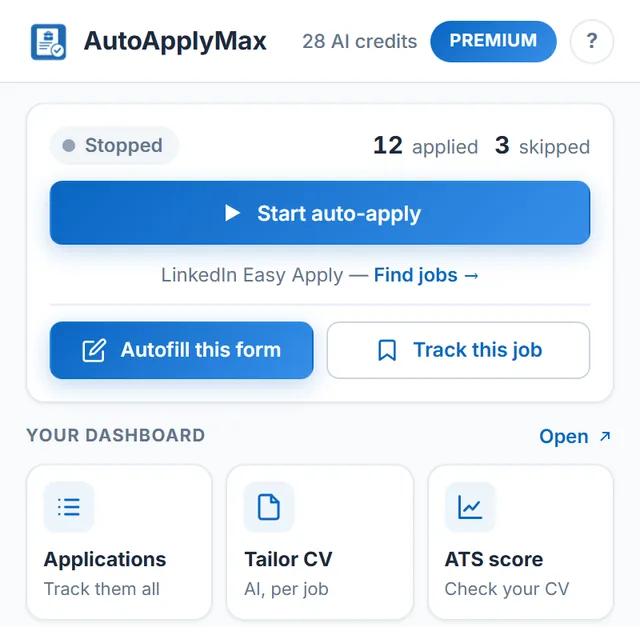
- AutoApplyMax auto-applies on LinkedIn Easy Apply and autofills Indeed SmartApply forms, reducing a 3-hour daily application routine to a 15-minute setup.
- Combining 3-4 specialized extensions creates a complete job search toolkit that handles every stage from discovery to follow-up.
- Chrome extensions that require your LinkedIn password violate platform terms of service -- always choose tools that operate within your existing browser session.
The modern job search is a numbers game. Between tailoring your resume, writing cover letters, tracking applications, and following up with recruiters, it can easily feel like a full-time job in itself. Fortunately, Chrome extensions have become indispensable allies for job seekers, automating tedious tasks and giving you a competitive edge.
In this guide, we have handpicked the best Chrome extensions for job search in 2026. Whether you want to automate applications on LinkedIn, find recruiter emails, or polish your professional writing, these tools will save you hours every week and help you land interviews faster.
1. AutoApplyMax — Automate LinkedIn Easy Apply at Scale
If you spend hours clicking through LinkedIn Easy Apply forms, AutoApplyMax is the single most impactful extension you can install. It automates the entire Easy Apply workflow on LinkedIn (the LinkedIn auto apply extension) and autofills applications on Indeed, Welcome to the Jungle, Glassdoor, Monster and company career sites with job application autofill, where you click Submit yourself, letting you apply to dozens of jobs while you focus on higher-value activities like networking and interview prep.
Key features:
- One-click bulk applications on LinkedIn Easy Apply, plus autofill on Indeed and more (you click Submit there)
- Smart form filling that remembers your answers across applications
- Built-in dashboard to track every application with status updates
- Configurable filters to target jobs by title, location, and experience level — ideal for targeting remote work positions
- Skip jobs you have already applied to automatically
Pricing: Free tier available with core automation features. Premium starts at $6.99/month for 30 AI credits a month, AI answers to screening questions and universal AI autofill.
AutoApplyMax turns what would be a three-hour daily routine into a 15-minute setup. For active job seekers applying to 20 or more positions per day, the time savings are enormous. For a deeper dive into how automation works, read our guide on how to automate your job applications.
2. LinkedIn Sales Navigator Lite — Find Decision Makers
Applying to jobs is only half the battle. The other half is getting your application noticed. LinkedIn Sales Navigator Lite (formerly Rapportive) helps you identify the hiring managers and recruiters behind job postings so you can reach out directly and make a personal connection.
Key features:
- See LinkedIn profile details for any email address directly in Gmail
- Identify mutual connections who can introduce you to hiring managers
- View company insights and recent activity for target employers
- Save leads and get alerts when contacts change roles
Pricing: Free basic version available. Full Sales Navigator starts at $69.90/month, but the Chrome extension alone provides significant value at no cost. Pair this with a fully optimized LinkedIn profile to maximize the impact.
3. Grammarly — Polish Every Cover Letter and Message
A single typo in a cover letter can move your application to the rejection pile. Grammarly works everywhere you type in Chrome, catching grammar mistakes, suggesting clearer phrasing, and helping you strike the right professional tone in emails to recruiters and hiring managers.
Key features:
- Real-time grammar, spelling, and punctuation checking
- Tone detection to ensure your messages sound confident and professional
- AI-powered rewriting suggestions for clarity and conciseness
- Works inside LinkedIn messages, Gmail, Google Docs, and job application forms
Pricing: Free tier covers essential grammar checks. Grammarly Premium ($12/month) adds advanced style suggestions, plagiarism detection, and full-sentence rewrites.
4. Simplify — Auto-Fill Job Applications Everywhere
Not every company uses LinkedIn Easy Apply. For traditional job applications on company career pages, Simplify auto-fills your information across thousands of application forms, saving you from re-entering the same details over and over again.
Key features:
- One-click auto-fill on company career sites and ATS platforms like Workday, Greenhouse, and Lever
- Stores your work history, education, and personal details in a single profile
- Tracks every application you submit in a centralized dashboard
- Supports resume uploads and custom question answers
Pricing: Free for basic auto-fill. Simplify Pro ($7.99/month) adds application tracking and advanced form detection.
When combined with AutoApplyMax for LinkedIn and Indeed, Simplify covers the remaining job boards and company sites, giving you full coverage across the job market. For a detailed head-to-head breakdown, see our AutoApplyMax vs Simplify comparison.
5. Glassdoor — Salary Insights While You Browse Jobs
Knowing your market value is critical before applying or negotiating. The Glassdoor Chrome extension overlays salary data, company reviews, and interview insights directly onto job listings as you browse LinkedIn, Indeed, and other job boards.
Key features:
- See estimated salary ranges on job listings without leaving the page
- Read employee reviews and company ratings inline
- View interview difficulty scores and common questions for specific companies
- Compare benefits and workplace culture across employers
Pricing: Completely free. Glassdoor is supported by employer branding and job advertising revenue, so all salary and review data is available at no cost.
6. Hunter.io — Find Recruiter Email Addresses
Sometimes the best way to get hired is to bypass the application form entirely and email the hiring manager directly. Hunter.io finds professional email addresses associated with any company domain, giving you a direct line to the people who make hiring decisions.
Key features:
- Find email addresses by company domain or individual name
- Email verification to ensure your messages reach real inboxes
- Confidence scores for each email address found
- Bulk search capabilities for targeting multiple companies at once
Pricing: Free for 25 searches per month. Paid plans start at $49/month for 500 searches, which is more than enough for most active job seekers.
7. Todoist — Organize Your Job Search Pipeline
A disorganized job search leads to missed deadlines, forgotten follow-ups, and duplicated effort. Todoist turns your browser into a task management hub, letting you create follow-up reminders, track application statuses, and organize your entire job search pipeline from a single interface.
Key features:
- Add tasks from any webpage with one click, including job listing URLs
- Set due dates and reminders for follow-up emails and interview prep
- Organize applications by project, label, or priority level
- Syncs across desktop, mobile, and web for seamless tracking
Pricing: Free for up to 5 active projects. Todoist Pro ($4/month) unlocks reminders, filters, and unlimited projects.
8. Loom — Stand Out with Video Introductions
In a sea of text-based applications, a short video introduction can make you memorable. Loom lets you record quick, professional video messages directly from your browser and share them with recruiters or hiring managers alongside your application.
Key features:
- Record screen, camera, or both in under 60 seconds
- Automatic transcription and captions for accessibility
- Shareable links that work in emails, LinkedIn messages, and application forms
- View notifications so you know when a recruiter watches your video
Pricing: Free for up to 25 videos of 5 minutes each. Loom Business ($12.50/month) removes limits and adds analytics.
A 60-second Loom video explaining why you are excited about a role can dramatically increase your response rate, especially for customer-facing or creative positions.
9. Teal — Bookmark Jobs and Match Them to Your Resume
Teal is a career platform whose Chrome extension saves job postings from LinkedIn, Indeed and other job boards into a single job tracker, along with the full job description. Inside Teal you can compare a saved posting with your resume and see which of its keywords you already cover.
Key features:
- Save a job from the posting page in one click, with the job description attached
- Track each saved job by stage, with notes, contacts and follow-up dates
- Keyword view that compares a posting with your resume
- Resume builder in the same account
Pricing: Free plan available. Teal+ is a paid upgrade that unlocks the advanced resume and matching features. Teal does not submit applications for you. See how it compares in AutoApplyMax vs Teal.
10. Huntr — A Kanban Board for Your Job Search
Huntr is a job search tracker. Its Chrome extension clips a job posting from any website into a Kanban-style board, so every application moves through columns such as Wishlist, Applied, Interview and Offer instead of living in a spreadsheet.
Key features:
- Save jobs from any job board or company career page
- Drag-and-drop board to move each application through your own stages
- Contacts, notes, tasks and dates attached to each job
- Resume and cover letter tools in the paid plan
Pricing: Free plan available; Huntr Pro is paid. If you mainly apply through LinkedIn Easy Apply, a tracker that fills itself (like the AutoApplyMax job application tracker) saves the clipping step. Full breakdown: AutoApplyMax vs Huntr.
11. Jobscan — Resume Match Rate on Job Postings
Jobscan is known for its ATS resume scanner. Its Chrome extension works on job postings (LinkedIn, Indeed and other boards): it reads the job description and shows how well your resume matches it, so you can see the missing keywords before you apply.
Key features:
- Match rate between your resume and the posting you are viewing
- List of hard skills and keywords from the job description
- Save jobs to Jobscan's own job tracker
- Links into Jobscan's full resume scan and LinkedIn tools
Pricing: A limited number of free scans; full use needs a paid Jobscan plan. To check a resume against a job description without an account, you can also use our free ATS score checker. Comparison: AutoApplyMax vs Jobscan.
12. Careerflow — Job Tracker and LinkedIn Profile Review
Careerflow combines a job tracker with LinkedIn profile help. Its Chrome extension saves jobs from LinkedIn, Indeed and other job sites to a board, and on your LinkedIn profile it points out sections to improve.
Key features:
- Save jobs from major job boards to a tracking board
- LinkedIn profile review with suggestions for each section
- AI writing help for resumes, cover letters and LinkedIn content
- Autofill for application forms on supported sites
Pricing: Free plan available, with paid plans for the AI features. Careerflow is a tracker and assistant rather than an auto-apply tool. Comparison: AutoApplyMax vs Careerflow.
| Extension | Primary Function | Free Tier | Premium Price | Best For |
|---|---|---|---|---|
| AutoApplyMax | Application automation | Yes | From $6.99/mo | High-volume LinkedIn & Indeed applicants |
| Simplify | Form auto-fill | Yes | $7.99/mo | Company career page applications |
| Grammarly | Writing assistant | Yes | $12/mo | Cover letters, emails, LinkedIn messages |
| Glassdoor | Salary & reviews | Yes (fully free) | N/A | Salary research & company evaluation |
| Hunter.io | Email finder | 25 searches/mo | From $49/mo | Direct outreach to hiring managers |
| Todoist | Task management | Yes | $4/mo | Tracking follow-ups & deadlines |
| Loom | Video introductions | 25 videos | $12.50/mo | Standing out with video messages |
| Teal | Job bookmarking & tracking | Yes | Teal+ (paid) | Saving jobs and matching keywords |
| Huntr | Job tracker (Kanban board) | Yes | Huntr Pro (paid) | Visual pipeline across many job sites |
| Jobscan | Resume match rate | Limited scans | Paid plans | Checking keywords on a posting |
| Careerflow | Job tracker & LinkedIn review | Yes | Paid plans | Tracking plus LinkedIn profile tips |
Job search automation and aggregator extensions: what to expect
"Job search automation" and "job aggregator" extensions are three different kinds of tool, and it helps to know which one you need:
- Auto-apply extensions submit applications for you. AutoApplyMax does this on LinkedIn Easy Apply. Our auto-apply extension comparison covers the alternatives.
- Autofill extensions fill the application form and you review and click Submit. Simplify works this way, and so does AutoApplyMax on Indeed, Glassdoor, Workday, Greenhouse and other career sites.
- Aggregators and trackers collect postings from several job boards into one list so you can compare and follow them. They don't apply for you; pair one with a job application tracker if you apply on many sites.
If a tool advertises "scraping" thousands of listings, check how it collects them and whether it asks for your job-board password. Prefer extensions that run in your own browser session, on pages you open.
Building Your Job Search Toolkit
No single extension will land you a job on its own, but the right combination can multiply your efficiency. Here is a recommended stack for serious job seekers in 2026:
- AutoApplyMax for high-volume LinkedIn Easy Apply applications, plus autofill on Indeed
- Simplify for company career pages and ATS forms
- Grammarly for error-free communication everywhere
- Glassdoor for salary research before applying or negotiating
- Hunter.io for direct outreach to hiring managers
- Todoist for tracking follow-ups and deadlines
Together, these Chrome extensions for job search transform a chaotic process into a streamlined system. You spend less time on repetitive tasks and more time on what actually gets you hired: building relationships, preparing for interviews, and showcasing your skills. To go further, explore the full landscape of AI-powered tools for job search that go beyond browser extensions.
The job market in 2026 rewards speed and consistency. Candidates who apply early, follow up promptly, and present themselves professionally have a significant advantage. With the right extensions installed, you are equipped to do exactly that.
Start Automating Your Job Search
AutoApplyMax is the #1 Chrome extension for automating LinkedIn Easy Apply. Install it free today.
Add the extension to ChromeFrequently Asked Questions
What is the best Chrome extension for job applications in 2026?
AutoApplyMax is the top-rated free Chrome extension for automating LinkedIn Easy Apply, capable of submitting 50+ tailored applications per hour while you focus on interviews. For everything outside LinkedIn — company career pages, Workday, Greenhouse — Simplify is the strongest auto-fill complement.
Are job-search Chrome extensions safe to use?
Yes, when you install from the official Chrome Web Store. Stick to extensions with thousands of reviews, a verified publisher badge, and a privacy policy that explains what data is collected. Avoid extensions that ask for unrelated permissions like access to all your browsing history.
Can I install multiple job-search extensions at the same time?
Yes, and you should. Each extension solves a different problem: AutoApplyMax handles bulk applying, Grammarly polishes your messages, Hunter.io finds recruiter emails, Glassdoor shows salary data. Running them together gives you a complete workflow with no overlap.
Do these extensions work on Indeed and LinkedIn?
AutoApplyMax auto-applies on LinkedIn Easy Apply and autofills application forms on Indeed and other job sites (you click Submit). Simplify auto-fills on hundreds of company career sites including most major ATS systems (Workday, Greenhouse, Lever). Glassdoor overlays salary data on both LinkedIn and Indeed job listings.
Which Chrome extensions automate the job search?
Auto-apply extensions (AutoApplyMax on LinkedIn Easy Apply) submit applications for you; autofill extensions (Simplify, AutoApplyMax on other job sites) fill forms for you to submit; aggregators and trackers gather postings and track your applications without applying.