Why spreadsheets fail for job hunting
You've heard the advice: "Track every application in a spreadsheet." Most people start one. Few keep it up past the second week. Why?
- Manual entry is exhausting — after 20 apps, opening the spreadsheet to log another one is a chore
- Missing context — you can't remember which site, which job description or which resume version
- No follow-up prompts — you forget which apps need a nudge at day 7 or day 14
- No analytics — no way to know if LinkedIn converts better than Indeed for your role
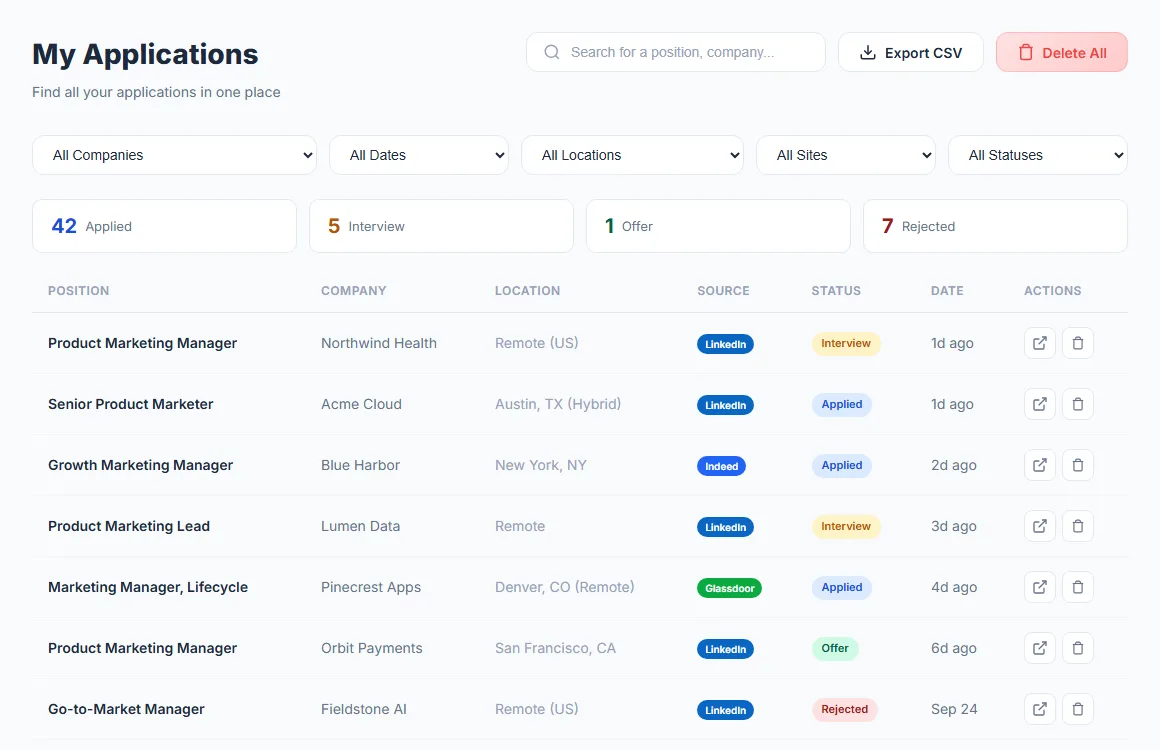
AutoApplyMax fixes this at the source. LinkedIn auto-applies are logged the moment they're sent, and any other job takes one click from the extension, with company, role, location, source and date. Your dashboard stays up to date, with no-reply flags and response stats built in.
Job application tracker template: the columns that matter
Whether you use our tracker, Google Sheets or Excel, the same columns do the work. Fewer columns than this and you lose the context you need for follow-ups and interviews; many more and you stop filling it in by week two.
| Column | Example | Why you need it |
|---|
| Date applied | 2026-10-14 | Drives follow-up timing and your weekly pace |
| Company | Shopify | Avoids applying twice to the same employer |
| Job title | Senior Data Analyst | Recruiters call about "the analyst role"; you need to know which one |
| Link to the posting | URL | Postings disappear; save a copy of the description too |
| Source | LinkedIn Easy Apply, Indeed, company site, referral | Shows which channel gets you replies |
| Location / remote | Toronto, ON (hybrid) | Salary, work authorization and commute all depend on it |
| Resume version | analyst-v3-sql.pdf | So you know what the recruiter read before an interview |
| Contact | Recruiter name, email | Who to follow up with |
| Status | Applied | One value from a fixed list (see below) |
| Last contact | 2026-10-21 | The date your follow-up clock restarts from |
| Next step + date | Follow up, 2026-10-28 | Turns the sheet into a to-do list |
| Salary range posted | $85k–$100k CAD | Many US and Canadian postings now show a pay range; keep it for negotiation |
| Notes | Hiring manager: Priya; asked about dbt | Interview prep in one place |
Copy this header row into the first row of a new sheet (or save it as a .csv file and import it):
Date applied,Company,Job title,Link,Source,Location,Resume version,Contact,Status,Last contact,Next step,Next step date,Salary range,Notes
Status pipeline: one definition per status
A tracker is only useful if every row uses the same words. Pick definitions once and stick to them:
- Saved: you want to apply but haven't yet. Clear these weekly; a saved job older than two weeks is usually filled.
- Applied: the application is submitted. The date applied starts the follow-up clock.
- Interview: any human conversation about the role, from the first recruiter screen to the final round. Note the round in Notes.
- Offer: a verbal or written offer. Record the salary, the start date and the deadline to answer.
- Rejected: a "no" from the employer, or you withdrew. Keep the row; it still counts toward your response rate.
"No reply" is not a status of its own: it is an Applied row that is getting old. That is why both our tracker on this page and the dashboard flag Applied rows after 7 days instead of asking you to move them.
When to follow up on a job application
- After about a week with no reply: one short message to the recruiter or hiring manager, restating the role and one reason you fit. Our follow-up email template has the wording.
- About a week later: one last nudge, then stop and move the energy to new applications.
- After an interview: a thank-you note the same day or the next, then follow up on the date they gave you for a decision.
- Easy Apply jobs without a named contact: look up the recruiter or hiring manager on LinkedIn and send a brief connection note. See how to follow up after applying.
How to build a job application tracker in Google Sheets or Excel
- Paste the header row above into row 1 and freeze it (Sheets: View → Freeze → 1 row; Excel: View → Freeze Panes → Freeze Top Row).
- Make Status a dropdown so nobody types "interviewing" one day and "Interview" the next. Sheets: Data → Data validation → Dropdown. Excel: Data → Data Validation → List. Values: Saved, Applied, Interview, Offer, Rejected.
- Highlight stale applications. With the date in column A and the status in column I, add a conditional-format rule with a custom formula:
=AND($I2="Applied",TODAY()-$A2>=7). Rows waiting a week or more turn yellow.
- Compute your response rate (share of submitted applications with any reply, rejections included):
=(COUNTIF(I:I,"Interview")+COUNTIF(I:I,"Offer")+COUNTIF(I:I,"Rejected"))/(COUNTA(I:I)-1-COUNTIF(I:I,"Saved")), formatted as a percentage.
- Add a filter view by Source to compare channels, and a pivot table of applications per week if you want a pace chart.
Already using the tracker at the top of this page? Its Export CSV button gives you a file you can open in Sheets (File → Import) or Excel and continue there.
How to track job applications on LinkedIn
LinkedIn keeps its own list under My jobs → Applied for jobs you applied to through Easy Apply. For jobs where you clicked through to the company website, LinkedIn only knows you applied if you confirm it when it asks. That list has no statuses of your own, no notes, no follow-up dates and nothing from Indeed or company career sites. The fix: with the AutoApplyMax extension, applications sent by LinkedIn auto-apply are logged in your tracker automatically, and on any other job page you click "Track this job" in the popup.
Metrics worth checking every week
- Applications sent: your pace. Our guide on how many jobs to apply to per week helps set a target.
- Response rate by source: if company-site applications get replies and Easy Apply doesn't (or the reverse), move your time.
- Interview rate: interviews divided by applications. A good response rate with few interviews points to the screening calls, not the resume.
- Response rate by resume version: the cleanest test of a resume change. If a version stays near zero after a few dozen applications, run it through the ATS score checker or build a tailored version.
We don't publish a "good" benchmark because none holds across roles, seniority and markets: compare yourself with your own previous weeks.
Spreadsheet vs app: which job tracker should you use?
What the AutoApplyMax tracker does, and what it doesn't
- Does: log every LinkedIn Easy Apply application sent by auto-apply; save any other job in one click from the extension; keep statuses Applied, Interview, Offer and Rejected; filter by company, location, source, status and date; count the same job saved twice (same link, or same title and company) only once in your totals; export to CSV with date, position, company, location, status, source and link.
- Doesn't: read your inbox to change statuses for you (you update them in one click when a recruiter replies), or apply outside LinkedIn Easy Apply on its own: on other sites the extension autofills the form and you click Submit.
More detail in our job application tracker guide and the comparison AutoApplyMax vs Huntr.