Writing a cover letter from scratch for every job application is one of the most tedious parts of a job search. It takes 20-40 minutes per letter, and most candidates either skip it entirely or copy-paste the same generic text every time.
Looking for the tool itself? Open the free AI cover letter generator: paste the job description and get a letter drafted from your profile, ready to edit and export. This guide covers how to get a letter worth sending.
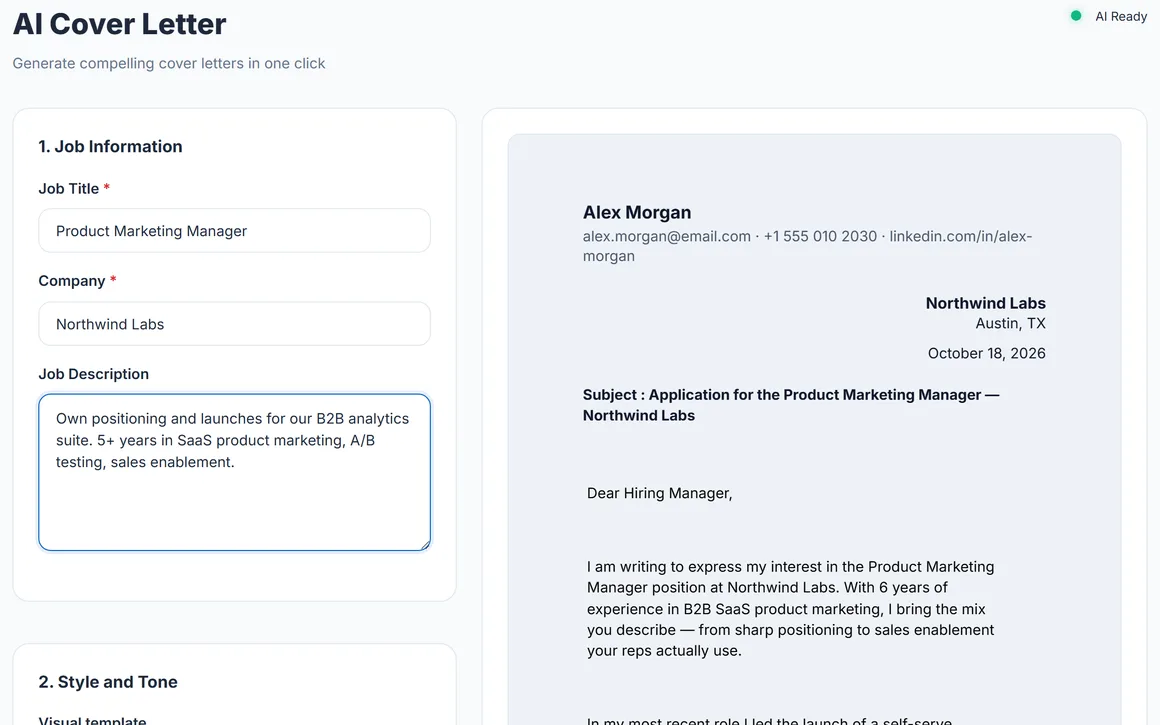
An AI cover letter generator changes that equation completely. With the right tool, you can produce a personalized, job-specific cover letter in under 30 seconds. This guide explains how AI cover letter writers work, how to get the best results, and the mistakes that will get your letter rejected.
Generate Cover Letters Instantly
AutoApplyMax includes a built-in AI cover letter generator. Paste a job description, get a tailored letter in seconds.
Add the extension to ChromeDo Cover Letters Still Matter in 2026?
Short answer: yes, but not for every application.
A 2025 survey by ResumeBuilder found that 65% of hiring managers still read cover letters when they are submitted. More importantly, 78% of hiring managers said a strong cover letter has influenced their decision to interview a candidate who otherwise would not have made the cut.
Cover letters matter most in these situations:
- Career changes — a cover letter explains why you are switching industries and how your skills transfer
- Competitive roles — when 200+ people apply, a tailored letter helps you stand out from identical resumes
- Smaller companies — at startups and SMBs, hiring managers read applications more carefully than at large corporations
- Roles that require writing — marketing, communications, content, sales, and consulting roles use the cover letter as a writing sample
- When the posting asks for one — ignoring an explicit request signals carelessness
Cover letters matter less for high-volume roles with automated screening (warehouse, retail, fast food) or when the application form has no upload field for one. In those cases, focus your energy on optimizing your resume instead.
How AI Cover Letter Generators Work
AI cover letter generators use large language models (the same technology behind ChatGPT, Claude, and Gemini) to produce human-quality text based on inputs you provide. Here is the typical workflow:
- You provide your background — your resume, work experience, skills, or a brief summary of your qualifications
- You provide the target — the job title, company name, and ideally the full job description
- The AI generates a draft — a complete cover letter that matches your background to the job requirements
- You review and edit — adjust tone, add personal details, fix anything that feels off
The key difference between a good AI cover letter tool and a bad one is personalization. Generic tools produce generic letters. The best tools analyze the job description, identify the key requirements, and map them to your specific experience.
What makes AI-generated cover letters effective
AI excels at several things that humans struggle with when writing cover letters under time pressure:
- Structure — AI consistently produces well-organized letters with a clear opening, body, and close
- Keyword matching — AI naturally incorporates terms from the job description, which helps with ATS screening
- Professional tone — no awkward phrasing, no grammatical errors, no rambling paragraphs
- Speed — what takes 30 minutes manually takes 30 seconds with AI
How to Write an Effective AI Cover Letter Prompt
The quality of your AI-generated cover letter depends almost entirely on the quality of your prompt. Here is a framework that consistently produces strong results:
The 4-part prompt formula
- Role context — tell the AI what you want it to do: "Write a professional cover letter for a [job title] position at [company name]."
- Your background — include 3-5 bullet points about your relevant experience, skills, and achievements. Quantify where possible (e.g., "increased revenue by 35%").
- The job description — paste the full job description. This is the most important input. The AI will extract key requirements and tailor the letter accordingly.
- Constraints — specify length (250-350 words is ideal), tone (professional but warm), and any specific things to mention or avoid.
Example prompt
Here is a prompt you can adapt for any application:
Write a professional cover letter for the following job. Keep it under 300 words. Use a confident but genuine tone. Focus on how my experience directly addresses the job requirements. Do not use cliches like "I am excited to apply" or "I believe I would be a great fit."
My background:
- 4 years as a digital marketing manager at a B2B SaaS company
- Managed $500K/year ad budget across Google Ads and LinkedIn
- Grew organic traffic by 180% through SEO strategy
- Led a team of 3 content writers
Job description:
[Paste the full job description here]
Tips for better prompts
- Always paste the full job description — not just the title. The AI needs the details to personalize effectively.
- Include numbers — "managed a team of 12" and "reduced costs by 25%" give the AI concrete material to work with
- Specify what to avoid — if you hate corporate jargon, say so. If you want to downplay a career gap, mention it.
- Iterate — if the first draft is not right, ask the AI to revise specific sections rather than regenerating from scratch
5 Common Mistakes with AI Cover Letters
AI cover letter generators are powerful, but they can backfire if you use them carelessly. Here are the mistakes that hurt candidates most:
1. Sending the AI output without reading it
This is the number one mistake. AI sometimes hallucates details, invents job titles you never held, or references the wrong company name. Always read the letter before sending it. A 60-second review catches 95% of issues.
2. Using overly generic prompts
If your prompt is "write me a cover letter for a marketing job," the output will be vague and unusable. The more specific your input, the more specific the output. Include the company name, the exact job title, and the full job description.
3. Making the letter too long
AI models tend to be verbose by default. A cover letter should be 250-350 words — roughly one page. If the AI generates 500+ words, ask it to cut it down. Hiring managers spend an average of 30 seconds scanning a cover letter. Brevity is respect.
4. Not adding a personal touch
The best cover letters include something AI cannot generate on its own: a genuine personal connection. Maybe you used the company's product and loved it. Maybe you met someone from their team at a conference. Add one sentence of authentic personal detail and the letter will feel human.
5. Using the same letter for every job
The whole point of AI is that you can generate a unique letter for every application in seconds. If you generate one letter and reuse it, you are defeating the purpose. Each letter should reference the specific job title, company name, and key requirements from the posting.
How AutoApplyMax's Cover Letter Generator Works
AutoApplyMax includes a built-in AI cover letter generator directly in the extension's dashboard. Here is how it works, step by step:
Step 1: Set up your profile
When you first install AutoApplyMax, you fill in your profile: work experience, education, skills, and career summary. This data is stored locally and used as the foundation for every cover letter the AI generates. You only need to do this once.
Step 2: Paste the job description
Open the cover letter section in the AutoApplyMax dashboard. Paste the full job description from any job posting — LinkedIn, Indeed, Glassdoor, or any company career page. The AI analyzes the posting and identifies the key requirements, qualifications, and keywords.
Step 3: Generate your letter
Click "Generate." In under 30 seconds, the AI produces a complete, personalized cover letter that maps your experience to the job requirements. The letter uses professional language, maintains a natural tone, and incorporates relevant keywords for ATS compatibility.
Step 4: Review and edit
The generated letter appears in an editable text area. Make any adjustments you want — add a personal anecdote, tweak the tone, remove a paragraph. Once you are satisfied, copy the text or download it as a document.
The entire process takes under two minutes, including review. Compare that to the 30-40 minutes most people spend writing a cover letter from scratch, and you can see why candidates using AI tools can send personalized letters to many more jobs.
Try the AI Cover Letter Generator
Install AutoApplyMax, open the dashboard, and generate your first tailored cover letter in 30 seconds.
Add the extension to ChromeAI Cover Letter Generator vs. Writing from Scratch
| Factor | AI Generator | Writing from Scratch |
|---|---|---|
| Time per letter | 30 seconds - 2 minutes | 20 - 40 minutes |
| Personalization | High (if job desc provided) | High (if effort invested) |
| Consistency | Always professional | Varies with energy level |
| Keyword optimization | Automatic | Manual effort required |
| Personal touch | Needs manual addition | Natural |
| Cost | Free (many tools) | Free |
| Scalability | 50+ letters/day easily | 2-3 letters/day max |
The optimal strategy is clear: use AI to generate the first draft, then spend 1-2 minutes personalizing it. You get the speed of automation with the authenticity of a human touch.
What to Include in Every AI Cover Letter
Whether you use AI or write from scratch, every effective cover letter should contain these elements:
Opening paragraph (2-3 sentences)
State the position you are applying for and one compelling reason you are a strong fit. Skip generic openings like "I am writing to express my interest." Instead, lead with your strongest qualification: "With 6 years of experience leading product teams at high-growth startups, I was immediately drawn to the Senior PM role at [Company]."
Body paragraphs (2-3 paragraphs)
Each paragraph should connect a key requirement from the job description to your specific experience. Use concrete numbers and outcomes. "In my current role, I reduced customer churn by 22% by redesigning the onboarding flow" is far more powerful than "I have experience with customer retention."
Closing paragraph (2-3 sentences)
Reaffirm your interest, mention your availability, and include a clear call to action: "I would welcome the opportunity to discuss how my experience with enterprise sales pipelines aligns with [Company]'s growth goals. I am available for a call at your convenience."
3 Cover Letter Templates to Use With an AI Generator
An AI cover letter generator works best when you already know the shape of the letter you want. The three templates below cover the situations most US and Canadian job seekers face. Use them two ways: paste one into your prompt as the structure the AI must follow, or compare the AI draft against it to see what is missing. Everything in brackets is yours to fill in with real facts — the AI should never invent them.
Template 1: Entry-level or recent graduate
When you have little paid experience, the letter has one job: connect a class project, internship or part-time role to the first requirement in the posting.
Dear Hiring Manager,
I am applying for the [job title] role at [Company]. In my [degree / program] at [school], I [project or coursework that matches the main requirement], using [two tools or skills named in the posting].
During my [internship / part-time job / volunteer role] at [organization], I [one concrete task with a result you can prove]. That experience taught me [skill the posting asks for], which I would bring to [team or responsibility named in the posting].
I am available to start [date] and would welcome a short call to discuss how I can support [team / goal from the posting].
Sincerely,
[Full name] · [City, State/Province] · [Phone] · [Email] · [LinkedIn URL]
Pair it with a resume built the same way: see our guide to writing a resume with no experience and the no-experience cover letter guide.
Template 2: Career changer
Recruiters reading a career-change letter want to know two things fast: why you are moving, and which of your existing skills transfer. Name the switch in the first paragraph instead of hiding it.
Dear [Hiring Manager's name, if listed],
After [number] years in [old field], I am moving into [new field] and applying for your [job title] role. The work I enjoy most in my current job — [transferable task] — is the core of this position.
At [current employer], I [transferable achievement, described with the new field's vocabulary]. I have also [course, certificate or side project in the new field], where I [what you built or learned].
I would bring [one strength from your old field that the new team may lack] to [Company]. I would be glad to talk about how my background fits [specific goal from the posting].
Best regards,
[Full name]
For the resume side of a switch, read how to rewrite your resume for a new industry.
Template 3: Experienced professional
With five or more years of experience, skip the life story. Lead with the one result that answers the posting's biggest need, then show range in a second example.
Dear [Name],
[Company]'s posting for a [job title] asks for someone who can [main responsibility, quoted from the posting]. In my current role as [title] at [employer], I [result that matches it, with a number you can verify].
Before that, at [previous employer], I [second achievement that covers another requirement]. Both roles involved [tool, method or stakeholder group named in the posting].
I would welcome the chance to discuss how I could help [team] with [priority mentioned in the posting].
Kind regards,
[Full name]
Before and After: Fixing Generic AI Sentences
Most AI drafts fail in the same places: an empty opening, vague claims and a passive close. The fix is always the same — replace the general statement with a specific fact from your own experience. Here are typical first-draft lines and the edits that make them sound like a real person.
| Generic AI line | Edited version |
|---|---|
| "I am writing to express my strong interest in this exciting opportunity." | "Your Customer Success Manager posting asks for someone who can onboard mid-market accounts — that has been my main job for the last two years." |
| "I am a highly motivated team player with excellent communication skills." | "I run the weekly handoff call between our sales and support teams and write the notes both teams work from." |
| "I have extensive experience with data analysis." | "I build the monthly sales dashboard in Power BI from SQL queries on our order database." |
| "I believe I would be a great fit for your company culture." | "I use your scheduling app with my own clients, and the way it handles time zones is why I want to help build it." |
| "Thank you for your time and consideration. I look forward to hearing from you." | "I am available for a call any weekday after 2 p.m. Eastern and can share samples of the reports mentioned above." |
The edited lines are examples — swap in your own tools, clients and tasks. If you cannot back a sentence with a real example, cut it.
How to Review an AI Cover Letter Before You Send It
Reading the draft once is not enough. Run through this checklist on every letter — it takes about two minutes and catches the errors that recruiters notice first.
- Company and job title. Check both are correct everywhere, including the greeting and the last paragraph. Reused prompts are the main source of wrong-company letters.
- Every fact is yours. Delete any title, employer, certification, number or tool you did not give the AI. Language models fill gaps with plausible details.
- Requirements covered. Pick the two or three must-have requirements in the posting and make sure each one is answered by a sentence in the letter.
- Same story as your resume. Dates, titles and achievements must match your resume exactly. A recruiter will read both.
- Length. Keep it to one page — three or four short paragraphs. Long AI paragraphs can usually lose a third of their words without losing meaning.
- Clichés removed. Search for "passionate", "dynamic", "synergy", "I believe" and "excited to apply" and replace them with facts.
- Read it aloud. If a sentence sounds like something you would never say in an interview, rewrite it in your own words.
Cover Letter Format for US and Canadian Applications
The conventions are almost identical in both countries, with a few details worth getting right:
- Header: your name, city and state or province, phone, email and LinkedIn URL. A full street address is optional; a photo, date of birth or marital status should not appear.
- Greeting: use the hiring manager's name when the posting or LinkedIn shows it. Otherwise, "Dear Hiring Manager" is standard and safe.
- Spelling: match the posting. Canadian employers often use Canadian spelling ("organization", "centre", "labour"); US employers use US spelling. Tell the AI which one to use.
- Language: for roles in Quebec or federal public-service positions, check whether the posting asks for French. If it does and you are bilingual, say so in the first paragraph.
- File format: upload a PDF with selectable text unless the portal asks for Word. Name it clearly, for example Firstname-Lastname-Cover-Letter.pdf.
- Text boxes: many applicant tracking systems (Workday, Greenhouse, Lever) offer a cover letter text field instead of an upload. Paste plain text, remove the header block and keep paragraphs short. Our Greenhouse application guide and Workday playbook show where these fields appear.
Free Tools to Use Alongside Your AI Cover Letter
A strong cover letter cannot rescue a resume that does not match the job, so check both together:
- AI cover letter writer — paste the job title, company and description; the letter is written from your resume for that job.
- Tailor your resume to a job description — free demo that shows your keyword match and rewrites a few bullets for the posting.
- ATS score checker — scores your resume against the posting and lists the missing keywords, which you can then mention in the letter where they are true.
- Resume checker — a quick review of structure, sections and length before you apply.
- Resume examples by job title and resume keywords by role — for example marketing manager resume examples with the matching marketing manager keywords, or customer service resume examples with customer service keywords. The same vocabulary works in a cover letter.
Beyond Cover Letters: The Full AI Job Search Stack
An AI cover letter generator is just one piece of a modern job search toolkit. To maximize your results, combine it with:
- AI resume builder — generate a tailored resume for each application, optimized for ATS keywords
- ATS score checker — scan your resume against the job description before submitting to ensure it passes automated screening
- Auto-apply extension — automate the repetitive parts of applying (filling forms, uploading documents, clicking submit)
- Application tracker — keep track of every application, status, and follow-up date in one place
- AI job search tools — a comprehensive overview of how AI is transforming every stage of the job search
AutoApplyMax bundles all of these features into a single Chrome extension. Install it once, set up your profile, and you have an AI resume builder, cover letter generator, ATS checker, auto-apply engine, and application tracker — all working together.
FAQ
Can AI write a good cover letter?
Yes. Modern AI models can generate well-structured, professional cover letters in seconds. The key is providing good input — paste the job description and your relevant experience, and the AI will produce a tailored letter. You should always review and lightly edit the output to add a personal touch.
Do recruiters know if you used AI for your cover letter?
Most recruiters cannot distinguish a well-edited AI cover letter from one written manually. The risk comes from using generic, unedited AI output. If you personalize the letter with specific details about the company and your experience, it will read as authentic.
Is it okay to use AI to write a cover letter?
Absolutely. Using AI for cover letters is widely accepted in 2026. Recruiters care about the quality and relevance of the letter, not how it was produced. Think of AI as a writing assistant that helps you articulate your qualifications more efficiently.
Are AI cover letter generators free?
Many AI cover letter tools offer free tiers. AutoApplyMax includes a built-in cover letter generator in its Chrome extension dashboard — paste a job description, and it generates a personalized letter using your saved profile. ChatGPT and other general AI tools can also generate cover letters for free with the right prompt.
How long should an AI-generated cover letter be?
One page: three or four short paragraphs, usually 250 to 350 words. If the AI produces more, ask it to cut the letter to the strongest two examples. Recruiters skim, so each paragraph should make one point.
Should I paste my cover letter into the text box or upload a PDF?
Follow the portal. If there is an upload field, use a PDF with selectable text. If there is only a text box, paste plain text without the header block, and keep short paragraphs so it stays readable after the formatting is stripped.
Does an ATS read the cover letter?
An applicant tracking system stores your cover letter with your application, and some systems make its text searchable, but recruiters mostly read it themselves. Write it for a person, using the same job-title and skill wording as the posting so it is consistent with your resume.
Can I use the same AI cover letter for several jobs?
Only as a starting point. Change at least the opening, the examples you pick and the closing for each posting, and check the company name and job title every time. Generating a fresh draft from the new job description is usually faster than editing an old letter.
What should I give an AI cover letter generator?
Your resume or a list of real achievements, the full job description, the company name and the tone you want. The more specific the input, the less the AI has to guess. Tell it explicitly not to add facts that are not in your resume.